

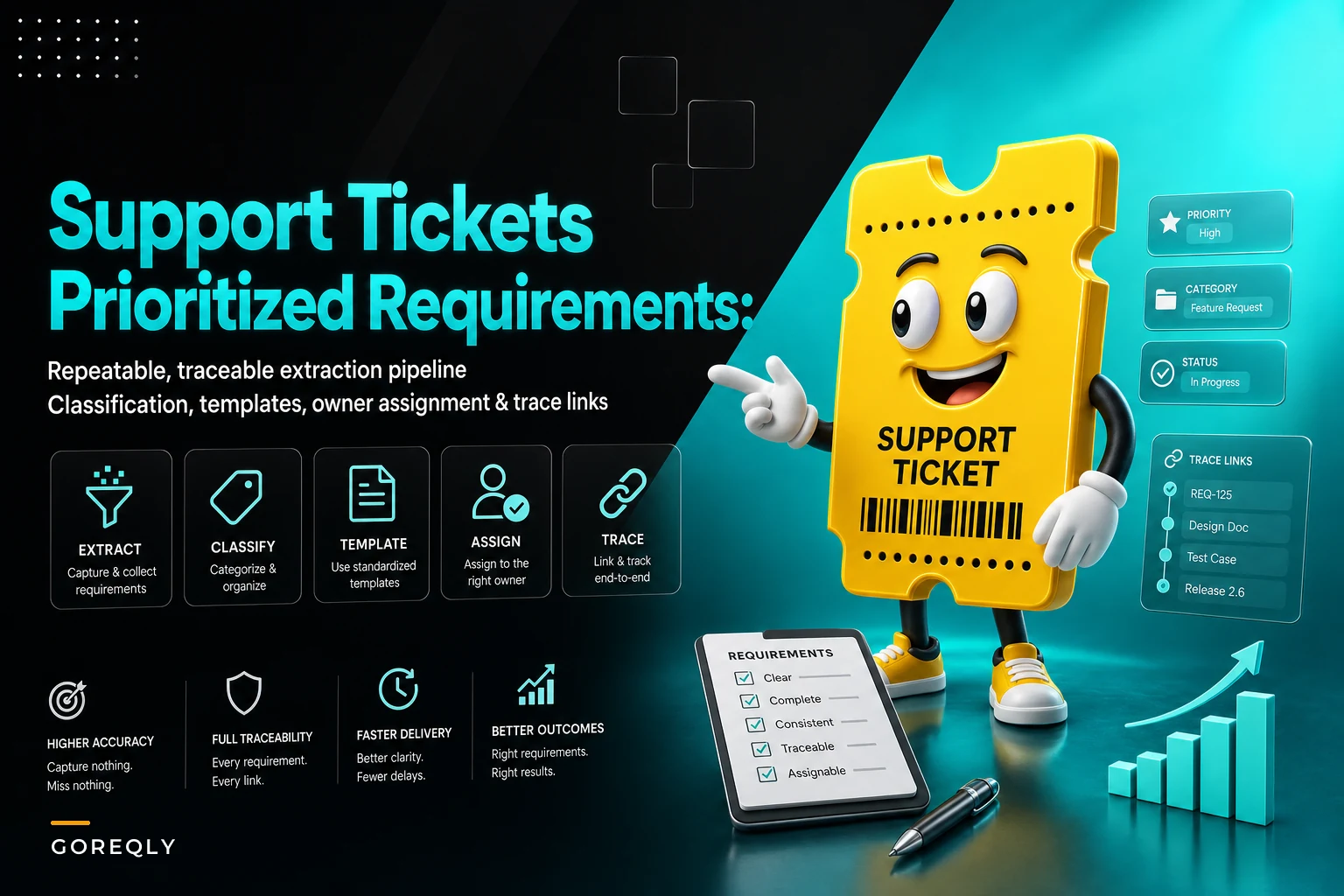

Support tickets contain the most honest feedback your product will ever receive. Customers don't write tickets to be polite. They write them because something broke their workflow, cost them time, or confused their team. Yet most product teams treat tickets like operational noise rather than requirements intelligence.
The disconnect happens because support data lives in one system, requirements live in another, and nobody has time to manually connect dots between angry customer emails and sprint planning. Product managers rely on quarterly surveys and user interviews while support agents handle the same feature request for the fifteenth time this month, knowing it'll never make the roadmap.
Building a pipeline that converts support tickets into traceable requirements isn't complicated. It's mostly about classification rules, extraction templates, and owner assignments. The hard part is making it repeatable enough that teams actually use it week after week.
The extraction problem nobody talks about
Most teams think their ticket-to-requirement problem is volume. Too many tickets, not enough time to read them all. But volume isn't the real issue. The real issue is that support tickets and product requirements speak completely different languages.
A support ticket says: "The export button doesn't work when I have more than 500 rows selected and it's really frustrating because I need to send this report to my boss every Monday morning."
A product requirement says: "As a reporting user, I need to export datasets greater than 500 rows so that I can share weekly reports with stakeholders."
Same problem, different documentation standards. And that translation gap creates three operational failures that compound over time.
First, duplicate requirements proliferate. Five different customers report the same export issue using different words. Support categorizes them differently. Product creates multiple stories for the same underlying problem. Development estimates each one separately. You end up building the same feature three times or building three partial solutions that don't actually solve the original problem.
Second, priority signals get lost in translation. When a customer writes "this is killing our workflow," support marks it as "high priority" in their system. Product managers, looking at a sanitized requirement weeks later, see no urgency signals. The requirement gets groomed, estimated, and backlogged behind less critical work that had better documentation.
Third, implementation misses the actual need. The original ticket explained the business context — Monday morning reports to the boss. The extracted requirement mentions exports and row counts. Development builds a technically correct solution that exports 500+ rows but takes four minutes to process. Customer still can't use it for time-sensitive Monday reports. Ticket gets reopened. Cycle repeats.
Classification that actually scales
The standard approach to ticket classification — asking support agents to manually tag everything — breaks around 50 tickets per week. Agents get busy, tags get inconsistent, and the whole system degrades into "bug" and "other" within two months.
Stop losing track of critical project requirements.
GoReqly helps you capture, organize, and track every requirement with precision and clarity.
- Centralized requirements repository
- Collaborative editing & commenting
- Traceability & version control
No credit card required
Lightweight NLP classification works better, but only if you keep it simple. You don't need sophisticated language models. You need basic pattern matching that catches 80% of cases and lets humans handle the edges.
Start with intent classification. Every ticket falls into one of these buckets:
-
Bug report (something broke)
-
Feature request (need new capability)
-
Enhancement request (improve existing capability)
-
Usage question (how do I...)
-
Access issue (can't login/permission problem)
Bug reports contain patterns like "error," "broken," "not working," "used to work," or specific error messages. Feature requests contain phrases like "would be nice," "need ability to," "can you add," or "is there a way to."
Usage questions often hide feature gaps. When three customers ask "how do I export large datasets?" in the same week, that's not a documentation problem. That's a feature discovery problem.
Most teams mess up by trying to classify everything perfectly on the first pass. Instead, use confidence scoring. High-confidence classifications (85%+) go straight through. Medium confidence (60-85%) gets human review. Low confidence gets manual classification.
Export your last 500 tickets, manually classify them, and use that as training data so your classifier learns product-specific language.
The key is training the system on your actual tickets, not generic models. Export your last 500 tickets, manually classify them, and use that as training data. Your customers use specific language for your product. A "workspace" in your system might be a "project" in another. Generic classifiers miss these nuances.
Extraction templates that preserve context
Once classified, tickets need structured extraction. But don't try to extract everything. Focus on the minimum viable requirement:
For bug reports:
-
Current behavior (what happens now)
-
Expected behavior (what should happen)
-
Steps to reproduce
-
Business impact (who's affected and how often)
-
Workaround if any
For feature requests:
-
User story (who needs what and why)
-
Current limitation (what they can't do now)
-
Proposed solution (what customer suggested)
-
Business value (time saved, revenue impact, etc.)
-
Frequency (how often this need arises)
For enhancement requests:
-
Current workflow (step by step)
-
Pain point (specific friction moment)
-
Suggested improvement
-
Time impact (minutes saved per occurrence)
The extraction doesn't have to be perfect. It just has to be consistent enough that product managers can quickly scan and understand without reading the full ticket.
Templatized extraction using simple rules actually works. If ticket contains "error" + "when I" + [action], extract the action as reproduce steps. If ticket contains "need to" + [capability] + "because" + [reason], extract as user story. A spreadsheet with 20 well-tested extraction rules beats a complex NLP system that nobody understands how to maintain.
Owner assignment beyond "round robin"
Assignment rules determine whether extracted requirements actually get reviewed or die in someone's backlog. Round-robin assignment — spreading tickets equally across product managers — creates orphaned requirements that nobody owns.
Better assignment follows feature ownership. Map your product areas to specific owners:
| Product Area | Owner |
|---|---|
| Authentication/access | Security PM |
| Reporting/exports | Analytics PM |
| API/integrations | Platform PM |
| UI/workflow | Experience PM |
But feature ownership isn't enough. You need escalation rules based on impact. If three tickets about the same feature arrive in one week, escalate to senior product. If a ticket mentions revenue loss over $10k, escalate immediately. If customer churned citing this issue, escalate to product leadership.
The assignment system needs fallback rules. When the Analytics PM is out, who reviews reporting tickets? When nobody owns a feature area (common in early-stage products), who takes first pass? Without fallbacks, tickets pile up waiting for the "right" owner who's on vacation.
Some tickets need multiple owners. An API bug that breaks reporting needs both Platform and Analytics PMs. Instead of complex co-ownership rules, assign a primary owner who pulls in others as needed. Primary owner drives resolution, others provide input.
Trace links that teams actually maintain
Traceability sounds great in theory. Every ticket links to a requirement, every requirement links to a user story, every story links back to original tickets. In practice, these links break within weeks because maintaining them requires discipline that operational teams don't have during sprint crunches.
The only trace links that survive are the ones that provide immediate value. Don't link everything to everything. Link tickets to requirements (so you can notify customers when shipped). Link requirements to backlog items (so you can measure cycle time). Link backlog items to releases (so you can generate release notes).
Skip intermediate links that nobody uses. Don't link tickets to epics, epics to initiatives, initiatives to themes. These taxonomy exercises make consultants happy but provide zero operational value.
For the links you do maintain, make them bidirectional and automatic. When a requirement gets created from a ticket, auto-link them. When requirement becomes backlog item, auto-link. When backlog item ships, auto-update linked tickets.
The simplest trace model that works:
-
Ticket → Requirement (many-to-one)
-
Requirement → Backlog Item (one-to-one)
-
Backlog Item → Release (many-to-one)
This gives you enough visibility to answer: Which customers requested this? When will it ship? Who got notified? The trace model provides operational value without excessive complexity.
Metrics that actually matter
You can't improve a pipeline you don't measure. But most requirements KPIs don't drive action — they just create reports nobody reads.
For ticket-to-requirement pipelines, track five numbers:
Classification accuracy: What percentage of auto-classified tickets were correctly classified? Below 75% means your rules need tuning. Above 95% might mean you're being too conservative and sending too much to manual review.
Extraction completion rate: What percentage of tickets produce complete requirement extracts? If you're only extracting useful requirements from 30% of feature request tickets, your templates need work.
Assignment resolution time: How long from ticket creation to owner assignment? If tickets sit unassigned for more than 48 hours, your fallback rules aren't working.
Trace link persistence: What percentage of links remain valid after 30 days? If links break faster than 10% per month, your automation isn't working.
Cycle time by source: How long from ticket to shipped feature? Track separately for bugs vs features vs enhancements. Bugs taking longer than features means your pipeline prioritizes new work over fixes.
These five numbers tell you whether your pipeline works. If classification accuracy drops, investigate. If cycle time increases, find the bottleneck. If trace links break, fix the automation. Measuring what matters lets teams improve systematically rather than guessing at problems.
When your pipeline starts producing duplicate requirements
The most common pipeline failure happens when the same customer problem generates multiple requirements because your classification and extraction rules don't catch duplicates.
This happens in three patterns. First, customers describe the same problem differently. One says "can't export," another says "download broken," third says "report generation fails." Your pipeline creates three requirements for the same export bug.
Second, requirements get extracted at different granularities. One ticket generates "fix export for large datasets." Another generates "increase export row limit to 1000." Third generates "improve export performance." All addressing the same underlying issue, but at different abstraction levels.
Third, temporal spacing hides duplicates. Ticket arrives in January about export issues. Gets extracted, prioritized, backlogged. Similar ticket arrives in March. Different support agent, different classification, new requirement created. By April, you have three teams working on export improvements without realizing they're solving the same problem.
Deduplication can't be fully automated. But you can catch most duplicates with similarity scoring on extracted requirements. If new requirement has 70%+ semantic similarity to existing requirement, flag for human review. Don't auto-merge — you'll combine unrelated issues. Just surface potential duplicates weekly.
The operational fix that actually works: requirement grooming sessions where product managers review all new extracted requirements together. Takes 30 minutes weekly. Catches duplicates, clarifies ownership, and aligns priorities. Without this human checkpoint, pipelines create requirement soup that teams eventually abandon.
A real extraction pipeline in action
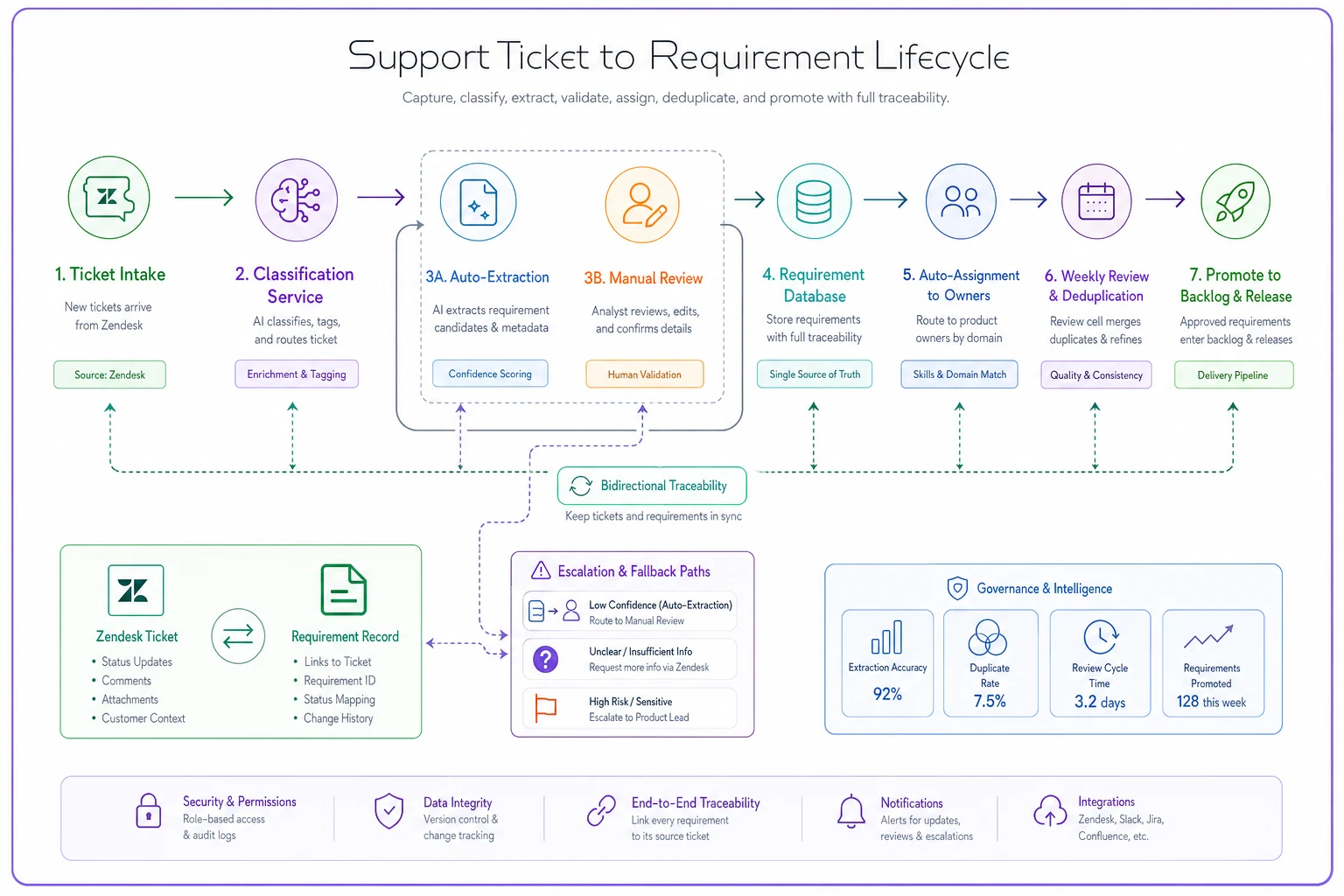
This is what it looks like at a 40-person B2B SaaS company handling roughly 200 support tickets weekly:
Tickets flow into Zendesk. Custom webhook sends every new ticket to classification service (Python script running basic NLP, nothing fancy). Classification happens in under two seconds, tags ticket with type and confidence score.
High-confidence feature requests and bugs (about 60% of tickets) get auto-extracted using regex templates. Extraction pulls user story, impact, and frequency into structured fields. Takes another two seconds per ticket.
Extracted requirements flow into Notion database with standard fields. Auto-assignment rules (based on product area keywords) assign owner. If no owner matches, goes to PM on rotation that week.
Every Thursday, product team runs 30-minute requirement review. They scan new extractions, merge duplicates, and promote validated requirements to Jira backlog. Average time from ticket to backlog: four days.
When requirement ships, automation updates linked tickets with release notes. Support agents notify customers. Customers feel heard. Tickets decrease for that issue.
The whole pipeline runs on about 500 lines of Python, some Zapier workflows, and basic webhook infrastructure. No complex ML models. No expensive platforms. Just rules, templates, and discipline.
Here's a simple diagram of the pipeline described above.
Six months in, they've reduced duplicate requirements by 70%, decreased average ticket resolution time from three weeks to eight days, and increased customer satisfaction scores by 12 points. More importantly, their roadmap now reflects actual customer problems rather than product manager assumptions. The operational software platform handles the routine extraction work, letting product teams focus on analysis and decision-making.
The extraction patterns that prevent rework
When requirements artifacts fail to scale, teams end up rebuilding the same extraction logic repeatedly. Avoid this by establishing patterns upfront.
For multi-part tickets (bug plus feature request), split during extraction. Create separate requirements for each part. Link them, but track independently. The bug might need hot-fixing while the feature request goes through normal prioritization.
For tickets with multiple customers affected, extract impact multipliers. If five customers report the same issue, the requirement should reflect "Affects 5+ customers" not just the latest reporter. This changes priority conversations.
For emotional tickets (angry customers, threats to cancel), extract business impact separately from emotional content. "Customer threatening to cancel" becomes "Risk: $45k annual contract" in the requirement. Product managers need facts, not feelings.
For tickets with proposed solutions, extract both problem and solution separately. Customers often suggest solutions that don't address root causes. Capture their suggestion, but focus requirement on the underlying problem. This pattern prevents building features that solve symptoms instead of problems.
When not to automate extraction
Some tickets shouldn't go through automated extraction. Strategic feedback from key accounts needs human interpretation. Security vulnerabilities need immediate escalation, not requirement extraction. Tickets from churned customers need different handling than active users.
Create bypass rules for:
-
Tickets from customers above revenue threshold
-
Security-related keywords
-
Executive escalations
-
Legal/compliance issues
-
Churn-related feedback
These still need processing, just not through standard pipeline. They need human eyes immediately, not systematic extraction next Thursday.
The mistake teams make is trying to force every ticket through the same pipeline. Some feedback is too important, too sensitive, or too complex for automation. Recognize these cases and route them appropriately. Your AI-powered operational software should enhance human judgment, not replace it entirely.
Making your pipeline stick
Most ticket-to-requirement pipelines fail not because of technical problems but because teams abandon them after initial enthusiasm fades. The pipeline works for two months, then someone forgets to review extractions, links break, and everyone reverts to manual processes.
Pipeline sustainability requires three commitments. First, one person owns pipeline health. Not the whole process, just monitoring those five metrics and raising alarms when something breaks. Without an owner, pipelines decay silently.
Second, regular pipeline review. Monthly meeting to discuss what's working, what's breaking, and what needs adjustment. Classification rules need tuning as product evolves. Extraction templates need updates as customer language changes. Without regular maintenance, accuracy degrades.
Third, visible value demonstration. Share monthly reports showing tickets converted to shipped features. Highlight customer responses when their reported issue gets fixed. Make the connection between pipeline operation and customer satisfaction explicit. When teams see impact, they maintain the process.
The teams that succeed with extraction pipelines treat them like production systems. They monitor health, fix breaks quickly, and continuously improve accuracy. The teams that fail treat them like side projects — nice to have but not mission-critical.
Your support tickets contain more actionable product intelligence than any user research session. But that intelligence remains locked in ticket queues until you build systematic extraction. Start simple. Classify with basic rules. Extract with templates. Assign with ownership maps. Link bidirectionally. Measure what matters.
The perfect extraction pipeline doesn't exist. But a functional pipeline that processes 80% of tickets beats manual review that processes 5%. Build the pipeline, maintain the discipline, and watch your roadmap align with actual customer needs rather than product manager speculation.
Ready to transform your product delivery?
Join 2,000+ teams using GoReqly to improve requirements accuracy, reduce rework, and accelerate time to market.