

Most onboarding plans for product managers and business analysts are people-first. You get a stack of intro calls, a Confluence link someone forgot to update, and a vague instruction to "get familiar with the product." Three weeks in, you're still guessing which document is authoritative and which one is a ghost that three teams silently abandoned.
The problem isn't a lack of information — it's that you have too much of it, in no defined reading order, with no signal about what's live versus dead. When you start acting before you understand the artifact landscape, you do one of two damaging things: you create a duplicate of something that already exists, or you orphan an artifact by editing a copy nobody else follows.
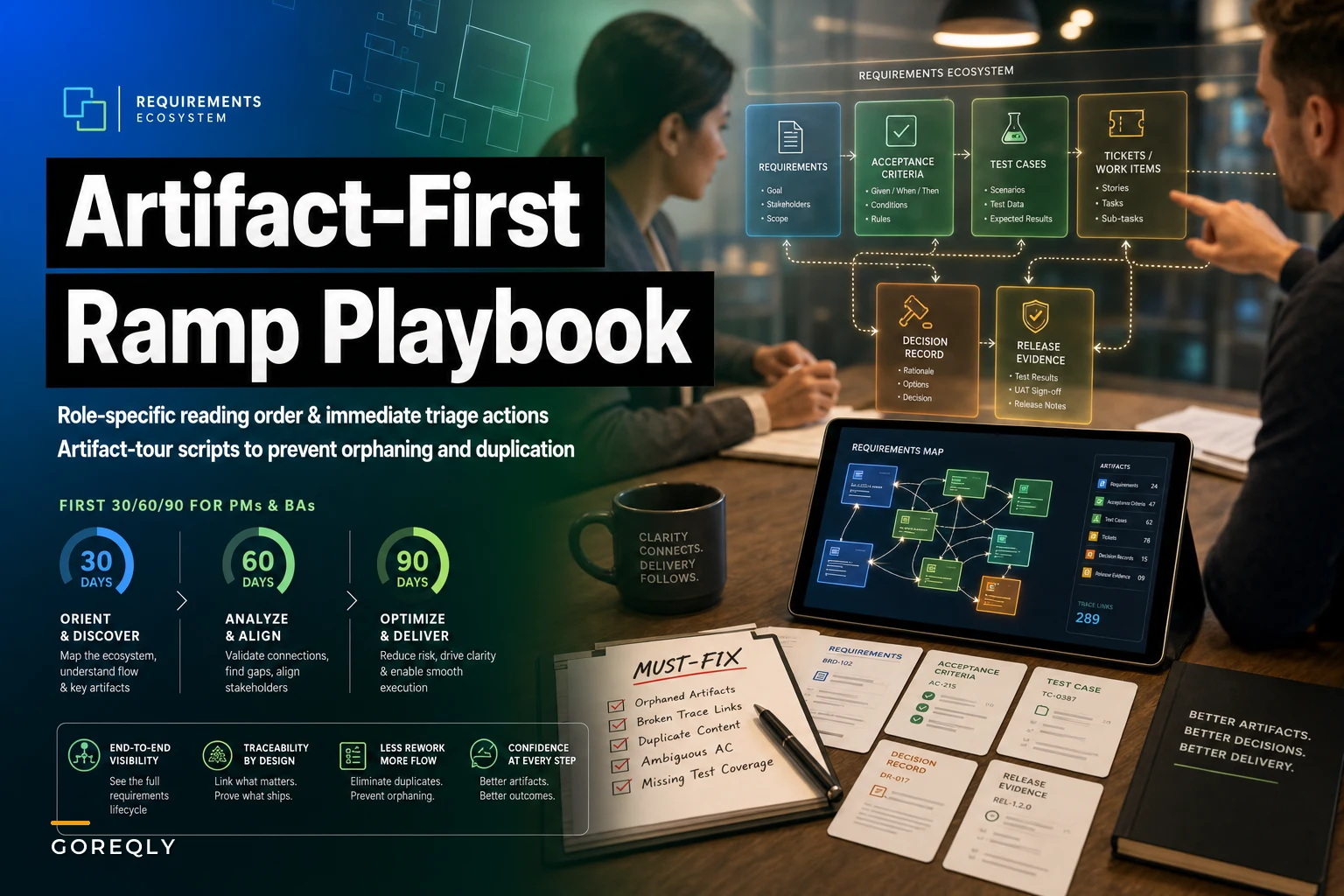
This is a ramp plan built around the artifacts themselves — what to read, in what order, what to fix immediately, and how to run an "artifact tour" that keeps you from breaking the graph before you understand it. It's specifically a PM BA onboarding requirements checklist organized by the 30/60/90 rhythm, but the sequencing matters more than the calendar.
Why the usual onboarding creates orphans and duplicates
When you join a team mid-stream, you inherit a requirements ecosystem that already has an implicit hierarchy — some documents are the source of truth, some are derivatives, some are stale snapshots that survived because deleting things feels risky. Nobody wrote this hierarchy down. It lives in people's heads, and half those people are on other teams now.
So you open a spec titled "Checkout Requirements v3 (FINAL)" and start annotating it. What you didn't know: the team migrated to a Jira epic six months ago, and "v3 FINAL" is a fossil. Now you've got fresh edits on a dead artifact, and the next person who finds it assumes your notes are current. That's orphaning — you've split the truth into two places, and the copy with the most recent timestamp usually wins by accident.
Duplication is the mirror image. You can't find the payment-retry acceptance criteria, so you write new ones. They already existed in a QA test-case doc under a different name. Now there are two definitions of "retry," they disagree on the timeout window, and a developer picks whichever one they found first.
Both failures spike in the first 45 days of any new PM or BA — precisely when someone is most active and least oriented. You're eager to contribute, you're producing artifacts, and you have no map. The fix is to force a reading order and delay creation until you've toured the ecosystem.
The 30/60/90 at a glance
Before the detail, here's the shape of it. Notice that creation deliberately doesn't show up until day 30+.
Stop losing track of critical project requirements.
GoReqly helps you capture, organize, and track every requirement with precision and clarity.
- Centralized requirements repository
- Collaborative editing & commenting
- Traceability & version control
No credit card required
| Phase | Primary mode | Artifact activity | What you're protecting against |
|---|---|---|---|
| Days 0–30 | Read + triage | Read-only, plus a must-fix list | Acting before you know the graph |
| Days 30–60 | Map + verify | Light edits, ownership tagging | Duplicating what already exists |
| Days 60–90 | Contribute | New artifacts, linked correctly | Orphaning by editing the wrong copy |
The single most common mistake is compressing this — treating day 5 like it's day 65 because you feel behind. You're not behind. Reading order is the work.
Days 0–30: artifact reading order and the must‑fix list
The first month is almost entirely reading, but reading in a deliberate sequence. Random reading is how you absorb the fossils along with the live docs and can't tell them apart.
The reading order that actually works
-
Release notes and changelogs, last 3–4 releases. This tells you what's actually shipping and, by omission, what isn't. Anything mentioned in a spec but absent from four releases of notes is a candidate fossil.
-
The current sprint board and the two most recent closed sprints. Ground truth for what "live" looks like right now — the vocabulary, the ticket structure, who's assigned to what.
-
Decision records or ADRs, if they exist. These explain why things are the way they are, which stops you from "fixing" a deliberate choice. If your team doesn't have these, that's your first must-fix item.
-
Epic-level requirements for whatever is in flight. Only now do the larger requirement artifacts make sense, because you can anchor them to real tickets.
-
The traceability links between requirements and tests. This is where you learn whether the ecosystem is healthy or held together with hope.
-
Everything labeled "FINAL," "v-something," or living in a shared drive folder. Read these last and read them skeptically. Assume dead until proven live.
Reading in decision-first order lets you use recency as a filter. Each layer helps you judge whether the next, older layer is still trustworthy.
The must‑fix list (immediate triage)
While you read, keep exactly one running list. Not a redesign plan — a triage list of things that are actively dangerous right now. The bar for this list is "someone could build the wrong thing because of this."
-
Contradictions between two live artifacts — same requirement, two different values. Flag, don't resolve yet. You resolve after you find the owner.
-
Requirements referenced in tickets that point to a doc that 404s or is empty. Broken links are silent until a regression hunt needs them.
-
Anything marked FINAL that contradicts the current sprint. Either it's a fossil that should be archived or the sprint is drifting. Both need a human.
-
Acceptance criteria that exist in more than one place with different wording. Duplication in progress — catch it before a dev picks the wrong copy.
-
Requirements with no owner listed. An unowned requirement is an orphan waiting to happen.
Notice what's not on this list: style, formatting, "this should be reorganized," anything aesthetic. Triage is about correctness and safety, not preference. New PMs and BAs burn enormous credibility in month one by reformatting things that were fine. Keep the must-fix list ruthlessly about breakage.
Days 30–60: the artifact tour that prevents duplication
By day 30 you can read the ecosystem. Now you verify it by touring it — walking each major artifact against a real, live example and confirming it's connected to reality. This is where you stop duplication, because a tour surfaces the things you'd otherwise recreate.
What an artifact tour actually is
An artifact tour is a scripted walkthrough where you take one concrete, in-flight feature and trace it end to end through every artifact type: the requirement, the acceptance criteria, the test cases, the tickets, the decision record, the release evidence. You're not reading in the abstract — you're following a single thread through the whole graph.
The value is that gaps become obvious. If you can't get from the requirement to a test, you've found a hole. If you find two requirements for the same thread, you've found duplication before you added a third.
Teams whose artifacts have grown faster than their structure tend to fail this tour badly — the thread breaks in multiple places. That's the same underlying condition described in when requirements artifacts fail to scale, and the tour is basically a diagnostic for it.
A repeatable artifact‑tour script
-
Pick a feature currently in the sprint — not a hypothetical, not a shipped-and-forgotten one.
-
Find its top-level requirement. Note the ID, owner, and last-modified date. If there are two, stop and log a duplication finding.
-
Trace down to acceptance criteria. Confirm the wording matches what QA is actually testing against.
-
Trace to test cases. Do they exist? Do they reference the requirement ID or a copy-pasted description that's drifted?
-
Trace to tickets. Does the ticket link back up, or is it floating?
-
Find the decision record. Why does this feature look the way it does? If there's no record, note it — that's future orphaning risk.
-
Check release evidence. If this shipped a version already, can you find proof of what was verified?
Every break in that chain goes into a separate "tour findings" doc — distinct from your day-one must-fix list, because these are structural, not urgent.
Here's a visual of the artifact-tour workflow.
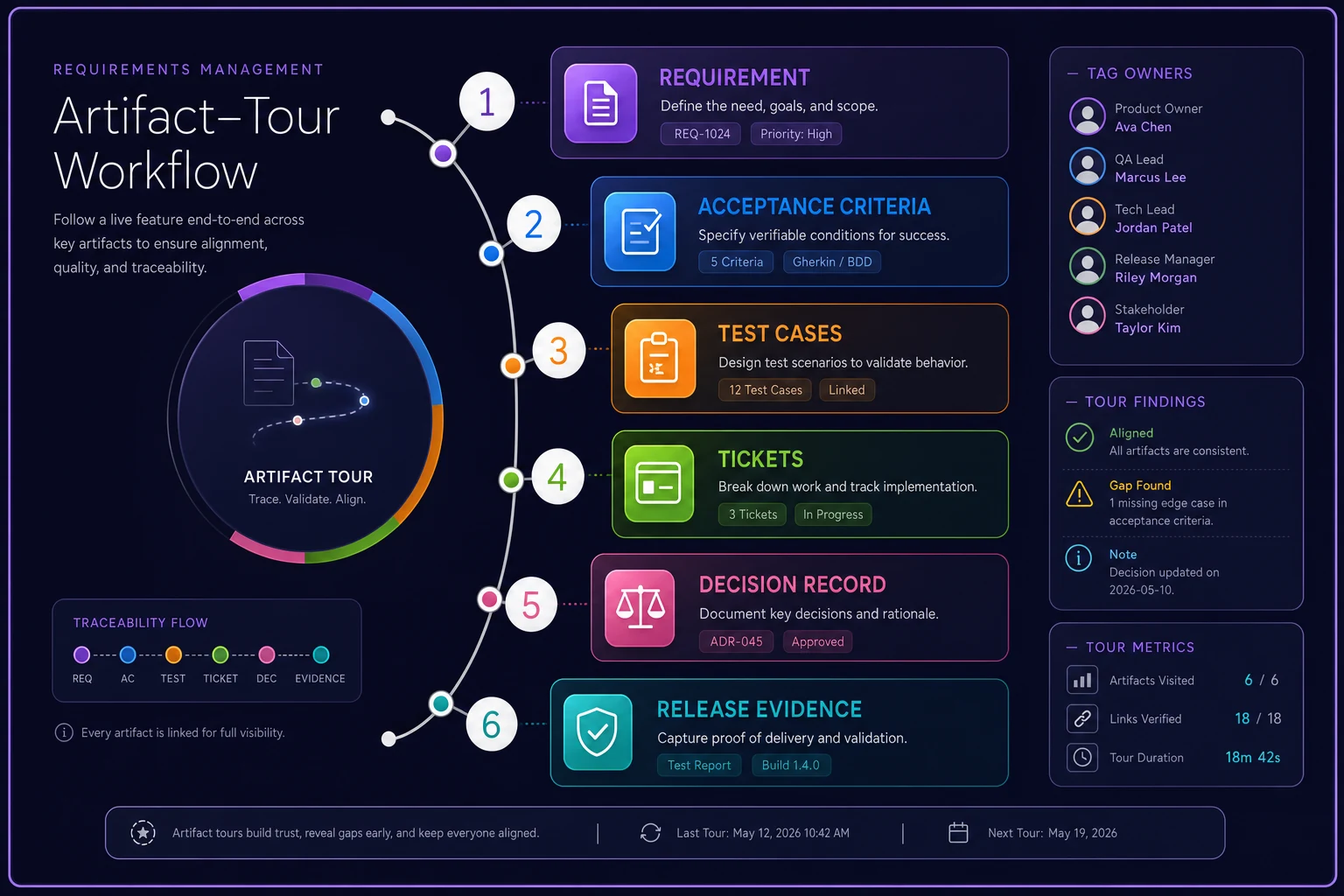
Visualizing the trace makes gaps obvious.
Tag ownership before you touch anything
The other job in this phase is attaching owners to artifacts that don't have them. This is the highest-leverage move for preventing future orphans, because most orphaning happens when an unowned artifact drifts and nobody notices. You don't need heavy process — a name and a date is enough. Every live artifact needs someone who'll notice if it goes stale.
A simple owner name and date is often enough to prevent most future orphaning.
If your team already treats requirements with version discipline — branching, tagging, clear merge points — the tour mostly confirms what's already true. The patterns in treating requirements like code are exactly what make an artifact tour fast instead of archaeological. Where that discipline is missing, the tour will show you precisely where to introduce it first.
Days 60–90: contribute without breaking the graph
Now you create. But creation follows two hard rules that come directly out of what your tour taught you.
Rule one: link before you write. Before drafting any new requirement or criteria, find where it attaches in the existing graph. If you can't find an attachment point, that's a signal to double-check you're not duplicating. New artifacts that float unattached are tomorrow's orphans.
Rule two: one edit location per truth. If you're updating something, update the source of truth, not a convenient copy. You spent 60 days learning which copy is authoritative — use that knowledge. Editing the wrong copy is how a seasoned PM still creates orphans on a team that's otherwise healthy.
By this point your must-fix list should be resolved or assigned, your tour findings should be turning into small structural improvements, and you should be adding to the ecosystem rather than accidentally forking it.
A realistic scenario
A mid-sized B2B software team — around 40 people, one product, three squads — brought on a business analyst to clean up a checkout and billing area that had gotten messy after two reorgs.
The previous person had ramped people-first: lots of meetings, immediate editing, no reading order. Within their first month they'd created a second set of billing acceptance criteria because they couldn't find the originals, which lived in a QA doc. For a quarter or so, two squads were building against different retry-timeout values. It surfaced as a support spike — refunds firing on a schedule nobody could explain.
The new BA ran an artifact-first ramp instead. Reading the sprint board before the old specs made the mismatch obvious almost immediately. The must-fix list flagged the timeout contradiction as item three. The artifact tour on the billing thread confirmed the test cases referenced a stale description rather than the requirement ID.
Over roughly 90 days: the duplicate criteria collapsed into one owned artifact, the retry contradiction got resolved with the actual engineer who made the original decision, and the number of billing requirements dropped from something like 14 scattered documents to around 9 with clear owners. No dramatic revenue story — just a support-ticket category that mostly stopped recurring, and a team that stopped arguing about which doc was real.
When an artifact‑first ramp makes sense — and when it doesn't
When it's the right call. Mature or messy ecosystems with real artifact volume — lots of specs, several squads, a history of reorgs. The more accumulated documentation, the more this pays off, because that's exactly where fossils and duplicates hide.
When it's overkill. A brand-new team with three tickets and no legacy docs doesn't need a 90-day tour. There's nothing to orphan yet. Read the board, talk to two people, start contributing. Forcing this ramp on a greenfield team is just process theater.
Who should be careful with it. If you're joining as a senior leader expected to drive change fast, a pure read-only first month will read as passivity to stakeholders who don't understand why. In that case, make the reading order visible — share the must-fix list weekly so people see the work happening. The triage list doubles nicely as proof you're contributing while protecting against the mistakes that eager newcomers usually make.
The short version
Ramp through the artifacts, not just the people. Read in decision-first order so recency filters out the fossils. Keep one ruthless must-fix list of things that could cause someone to build the wrong thing. Tour a live feature end to end before you trust the graph, and tag owners on anything that's floating. Only then start creating — link before you write, and edit the one true copy. Do it in that order and you avoid the two quiet failures that follow every new PM and BA around: the orphaned artifact nobody follows, and the duplicate that quietly contradicts the original. Neither shows up in your first month. Both show up in someone's regression hunt six months later — and by then, they're expensive to untangle.
Ready to transform your product delivery?
Join 2,000+ teams using GoReqly to improve requirements accuracy, reduce rework, and accelerate time to market.