


The project manager at a 45-person fintech startup just discovered their business analyst had been updating requirements in a separate document for three weeks. Meanwhile, the development team had been building features based on the original spec. Nobody noticed until QA started testing features that didn't match what product leadership approved.
This mess happens constantly. Requirements live in scattered documents, email threads, Confluence pages that nobody updates, and Jira tickets that drift from reality. Most teams treat requirements as static artifacts instead of living operational assets that need the same versioning rigor as code.
Working with hundreds of product teams, one pattern became clear: teams that apply version control patterns to their requirements documents ship better products with fewer surprises. Not because they create more documentation, but because they treat requirements as operational code that powers their entire development workflow.
The hidden cost of requirement drift
A health tech company lost four months of development time because their requirements lived in seventeen different places. Product managers updated Google Docs. Business analysts maintained separate Word documents. Developers referenced outdated Confluence pages. When they finally launched, the product barely resembled what customers requested.
Requirements version control fixes this operational mess. Instead of scattered documents, you maintain a single source of truth that tracks every change, shows who made it, and explains why. Think Git for requirements — branches for different features, tags for releases, merge requests for changes.
The operational impact hits immediately. Teams stop asking "which version is current?" They stop rebuilding features because requirements changed without notification. They stop explaining to stakeholders why the delivered product doesn't match approved specs.
Requirements become auditable. When a regulator asks why a feature works a certain way, you pull the exact requirements version that drove that decision, complete with approvals and change history.
Branching patterns that actually work for requirements
Traditional branching strategies from software development don't translate directly to requirements management. Code branches represent implementation variations. Requirement branches represent business decisions.
Stop losing track of critical project requirements.
GoReqly helps you capture, organize, and track every requirement with precision and clarity.
- Centralized requirements repository
- Collaborative editing & commenting
- Traceability & version control
No credit card required
Feature branches for isolated changes Create a branch when exploring a new feature or capability. This lets product managers experiment with requirements without affecting the main specification. A payments company might branch to explore cryptocurrency support while keeping their core payment requirements stable.
Release branches for version management Fork a release branch when requirements freeze for a specific version. Development builds against this branch while the main branch continues evolving for future releases. Changes to the release branch require explicit approval and impact analysis.
Hotfix branches for urgent corrections Sometimes you discover critical requirement gaps after development starts. Hotfix branches let you correct these issues without disrupting ongoing work. These changes merge back to both the release branch and main branch.
The branching strategy depends on your release cadence. Teams shipping weekly need lightweight branches that merge quickly. Teams with quarterly releases can maintain longer-lived branches with stricter merge controls.
Merge workflows that prevent requirement conflicts
Merging requirement changes requires different considerations than merging code. Code conflicts are technical — two developers changed the same function. Requirement conflicts are operational — two stakeholders have different visions for the same feature.
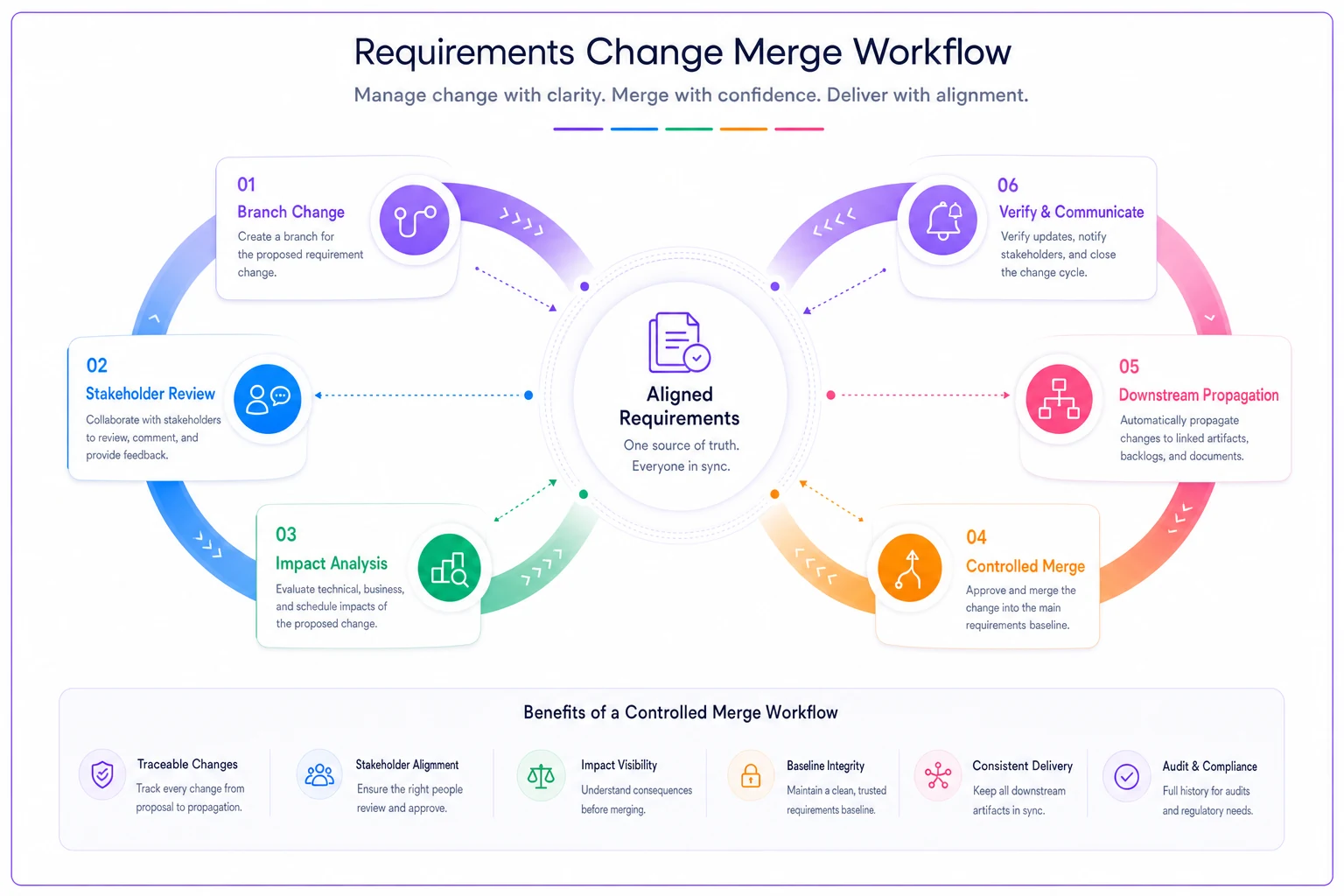
Here's a simple visualization of that merge workflow.
-
Change proposal creation Business analyst creates a branch and modifies requirements. They document the business reason, expected impact, and affected stakeholders.
-
Stakeholder review Product owner, technical lead, and affected teams review the changes. Unlike code reviews that check syntax and logic, requirement reviews verify business alignment and technical feasibility.
-
Impact analysis Before merging, analyze how changes affect in-flight development, testing scenarios, and downstream systems. A medical device company requires impact analysis from quality, regulatory, and engineering before any requirement merge.
-
Controlled merge Merges happen on a schedule, not randomly. Weekly merge windows work for most teams. Critical fixes merge immediately but trigger notifications to all affected parties.
-
Downstream propagation After merging, changes propagate to test plans, development tasks, and documentation. This isn't automatic — someone owns ensuring all artifacts reflect the updated requirements.
The biggest mistake teams make? Treating requirement merges like code merges. Code merges can happen dozens of times daily. Requirement merges need more ceremony because they affect business decisions, not just implementation details.
Release tagging for compliance and traceability
Every shipped version needs a corresponding requirements tag. This sounds obvious but most teams skip it, then scramble when asked "what requirements drove version 2.3.1?"
Effective tagging strategy:
Version tags mark shipped requirements Tag requirements when a version ships to production. Include the release date, version number, and approval status. These tags become your audit trail.
Milestone tags capture decision points Tag requirements at key decision points — design review, stakeholder approval, regulatory submission. These tags show requirement evolution, not just final state.
Baseline tags establish comparison points Create baseline tags before major requirement overhauls. This lets you compare current requirements against historical baselines to understand scope creep.
A financial services firm tags requirements for every production release. When auditors review their loan processing system, they pull the exact requirements that drove each feature, including approval chains and change justifications. What used to take weeks of document archaeology now takes minutes.
Parallel editing patterns without chaos
Multiple people editing requirements simultaneously creates chaos without proper patterns. The solution isn't preventing parallel work — it's managing it effectively.
Lock and edit pattern One person locks a requirement section while editing. Others can read but not modify. Works for critical requirements that need careful control. Downside: creates bottlenecks when multiple people need to contribute.
Branch and merge pattern Each contributor works in their own branch, then merges changes through a review process. Provides maximum flexibility but requires discipline about regular merges to prevent divergence.
Assigned ownership pattern Different people own different requirement sections. The authentication expert owns login requirements. The payments expert owns transaction requirements. Clear ownership prevents conflicts while allowing parallel work.
Time-boxed editing windows Requirements open for editing during specific windows — maybe Monday mornings for feature requirements, Thursday afternoons for technical constraints. Outside these windows, requirements stay locked. This forces batch processing but ensures everyone knows when changes happen.
Start by assigning ownership for the riskiest requirement areas so edits can proceed without locks whenever possible.
The right pattern depends on team size and culture. A three-person startup might use informal coordination. A fifty-person enterprise team needs formal ownership and merge procedures.
Building audit-friendly change logs
Regulators and auditors love documentation trails. Requirements version control gives them exactly what they want — complete history of who changed what, when, and why.
Effective change logs capture:
| Element | Purpose | Example |
|---|---|---|
| Change ID | Links to tracking system | REQ-2024-0847 |
| Author | Identifies responsible party | Sarah Chen (Business Analyst) |
| Timestamp | Proves sequence of events | 2024-03-15 14:32:07 UTC |
| Before state | Shows original requirement | "Users must authenticate with password" |
| After state | Shows modified requirement | "Users must authenticate with password or biometric" |
| Justification | Explains business reason | "Customer feedback shows 67% prefer biometric login" |
| Approval chain | Documents authorization | Product Owner → Security Lead → Compliance |
| Impact scope | Identifies affected areas | Login flow, session management, audit logging |
These logs serve multiple purposes beyond compliance. Development teams reference them when debugging issues. Product managers use them to understand requirement evolution. New team members read them to understand historical decisions.
Common pitfalls that derail requirements versioning
Treating all changes equally Not every requirement change needs the same level of control. Typo fixes don't need three approvals. Major functional changes do. Create different merge paths based on change significance.
Forgetting non-functional requirements Teams version functional requirements but forget performance, security, and compliance requirements. These change too and need the same version control rigor.
Versioning documents, not requirements Versioning a 200-page requirements document makes change tracking nearly impossible. Instead, version individual requirements or requirement sets. This enables granular tracking and targeted reviews.
Ignoring requirement dependencies Requirements don't exist in isolation. Changing authentication requirements affects every feature using authentication. Map dependencies and analyze ripple effects before merging changes.
Skipping the "why" documentation Recording what changed isn't enough. Document why it changed, who requested it, and what problem it solves. Future you will thank current you for this context.
Operational patterns from real implementations
A logistics company with 200 employees implemented requirements version control after losing $400k to misaligned features. They started simple — one master branch, weekly merges, basic change logs.
Their approach:
-
Monday morning requirement freeze for the week's development
-
Thursday afternoon merge window for next week's changes
-
Feature branches for anything taking longer than two weeks
-
Mandatory impact analysis for changes affecting more than three components
-
Quarterly baseline tags for major releases
The key insight: they didn't try to implement every version control pattern immediately. They started with basics and added sophistication as the team matured.
Tooling considerations for requirement versioning
While any version control system technically works for requirements, specialized tools make the process smoother. Git works but requires technical knowledge. Confluence has versioning but lacks branching. Jira tracks changes but doesn't support true version control patterns.
Modern requirements management platforms now include built-in version control designed specifically for requirements, not code. These platforms understand that requirements need different workflows than source files. They support visual diffing of requirement changes, stakeholder approval workflows, and automated impact analysis.
The tooling choice matters less than the discipline. A team using Google Docs with careful version naming beats a team with expensive tools but no process. Start with whatever tools you have, establish the patterns, then upgrade tools if needed.
Some teams build their own requirements versioning on top of existing tools. They use Git for storage, markdown for requirements format, and CI/CD pipelines for validation and publishing. This works well for technical teams comfortable with developer workflows.
When requirement versioning becomes essential
Not every team needs full requirements version control immediately. But certain situations make it non-negotiable:
Regulated industries Healthcare, finance, and aerospace teams face audit requirements that demand complete requirement traceability. Version control provides the audit trail automatically.
Distributed teams When product managers, analysts, and developers work across time zones, requirements version control prevents the chaos of conflicting changes and missed updates.
Long development cycles Projects spanning months or years see significant requirement evolution. Version control tracks this evolution and explains why early decisions changed.
Multiple parallel releases Teams maintaining multiple versions simultaneously need branching strategies to manage requirements for each version without confusion.
High cost of failure When requirement mistakes cost millions or risk lives, version control provides the safety net of review, approval, and rollback capabilities.
Making the transition without disrupting operations
Moving to versioned requirements doesn't require stopping everything. Start with new projects or features. Apply version control patterns to greenfield requirements while maintaining existing processes for legacy requirements.
Begin with the simplest useful pattern — usually just tracking changes with clear attribution. Add branching when you need parallel development. Implement formal merge workflows when conflicts become common. Layer in compliance features as audit requirements emerge.
The transformation typically takes 3-6 months for full adoption. Teams need time to adjust workflows, learn new tools, and develop muscle memory for version control patterns. Don't rush it. Better to move slowly with buy-in than quickly with resistance.
Training matters more than tooling. Developers understand version control but might not grasp requirement-specific patterns. Business analysts might fear the technical complexity. Invest in training that shows how version control makes their jobs easier, not harder.
The compound benefits of treating requirements as code
Requirements version control pays dividends beyond the obvious benefits. Teams develop more discipline about requirement changes. Stakeholders think harder before requesting modifications. Developers trust that requirements won't shift unexpectedly.
The cultural shift matters as much as the operational improvement. When requirements get the same respect as code, quality improves across the entire development lifecycle. Teams stop treating requirements as suggestions and start treating them as contracts.
Requirements actually become simpler. When you know you can evolve requirements safely, you don't need to capture every possible future scenario upfront. You document what you know today and trust the version control system to manage tomorrow's changes.
This operational foundation enables more sophisticated capabilities over time. Automated testing against specific requirement versions. Requirement coverage analysis across branches. Even AI-powered impact analysis of proposed changes. But these advanced features only work when built on solid version control patterns.
The path forward is clear: stop treating requirements like static documents and start treating them like the operational code they really are. Your future self, trying to understand why a feature works a certain way, will appreciate the breadcrumb trail you're creating today.
Ready to transform your product delivery?
Join 2,000+ teams using GoReqly to improve requirements accuracy, reduce rework, and accelerate time to market.