

A requirement link goes stale the moment the thing it points to changes underneath it — and nobody notices. The test case that validated REQ-4471 got deleted during a QA cleanup. The Jira story it traced to got closed as "won't do," but the requirement still says In Progress. The Confluence page holding the acceptance criteria moved, and now the link 302-redirects to a "page archived" notice. None of these throw errors. They just quietly rot until a release audit forces someone to open the link and find nothing on the other end.
This is the failure mode that traceability tools rarely warn you about. They're good at creating links. They're terrible at telling you when a link stopped being true. So the work of detecting stale requirement links falls to whoever's willing to write a few queries and run them on a schedule.
That's what this post is: practical scripts for the common trackers, a maintenance rhythm that actually gets followed, reconciliation rules that resolve conflicts without a meeting, and small automation snippets that reassign ownership before a stale link becomes someone's Friday-night emergency.
What "stale" actually means (so your queries catch the right things)
Before you write a single query, you need a definition tight enough to code against. "Stale" is not one condition — it's a handful of distinct states, and each one needs a different detection rule.
Here's the breakdown:
| Stale type | What it looks like | How you detect it |
|---|---|---|
| Dangling | Link points to an ID that no longer exists (deleted story, purged test) | Resolve the target; 404 / null response |
| Orphaned | Target exists but has no return link back to the requirement | Compare forward vs. backward link sets |
| Status-drift | Requirement says "Approved," linked story is "Cancelled" | Cross-check status fields across systems |
| Redirected | URL still resolves but 301/302s to a new location | Inspect HTTP status codes, not just 200-vs-error |
| Ownership-abandoned | Linked artifact's owner left; no one has touched it in 90+ days | Last-updated timestamp + assignee lookup |
| Version-mismatch | Link points to a fixed version of a spec that's since been superseded | Compare pinned version to current head |
The mistake most teams make is only checking for the first type — dangling links. Those are the easiest to catch and the least dangerous, because a hard 404 usually gets noticed fast. The quiet killers are status-drift and version-mismatch, where the link resolves perfectly and looks healthy but points to something that no longer means what the requirement claims it means.
Scripts for the common trackers
You don't need a platform to start detecting stale links. You need read access and a scheduled job. Below are patterns for the trackers most teams actually run.
Stop losing track of critical project requirements.
GoReqly helps you capture, organize, and track every requirement with precision and clarity.
- Centralized requirements repository
- Collaborative editing & commenting
- Traceability & version control
No credit card required
Jira: find requirements linked to closed or deleted issues
If your requirements live as Jira issues (issue type "Requirement" or via a custom field), JQL gets you surprisingly far for status-drift detection:
``
project = REQ
AND status in ("Approved", "In Progress")
AND issueFunction in linkedIssuesOf("status = Cancelled OR resolution = 'Won''t Do'")
``
That surfaces every "live" requirement still linked to something that got killed. The linkedIssuesOf function comes from ScriptRunner or a similar add-on; if you don't have it, pull links via the REST API instead:
``bash
# Get all issue links for a requirement, then check each target's status
curl -s -u $USER:$TOKEN \
"$JIRA/rest/api/3/issue/REQ-4471?fields=issuelinks" \
| jq -r '.fields.issuelinks[]
| .outwardIssue // .inwardIssue
| .key + " -> " + .fields.status.name'
``
Run that across your requirement set and flag any target status in your "dead" list (Cancelled, Won't Do, Closed-Duplicate). The output is a two-column list of exactly which requirements are pointing at graves.
Azure DevOps: WIQL for orphaned links
ADO's work item query language handles the linked-vs-unlinked case well. To find requirements with no linked test cases — a common orphan pattern after test suites get reorganized:
``sql
SELECT [System.Id], [System.Title]
FROM WorkItemLinks
WHERE [Source].[System.WorkItemType] = 'Requirement'
AND [Target].[System.WorkItemType] = 'Test Case'
MODE (DoesNotContain)
``
WIQL can't fully validate the health of a link, only its presence — so pair this with an API pass that pulls each linked test case and checks whether it's been run in the current cycle. A requirement linked to a test that hasn't executed in six months is stale in every way that matters, even though the link itself looks intact.
Plain URLs in Confluence, Notion, or docs
The messiest case is free-text links inside requirement documents — a URL someone pasted into a spec pointing to a design file or a decision record. No structured relationship, so you detect them by crawling.
``bash
# Extract URLs from exported markdown/HTML, then check each one
grep -oE 'https?://[^ )" ]+' requirements/*.md \
| sort -u \
| while read url; do
code=$(curl -s -o /dev/null -w "%{http_code}" -L "$url")
echo "$code $url"
done \
| grep -vE '^200 '
``
Anything that isn't a clean 200 goes on the review list. Watch the redirects specifically: a 301 might be fine (Confluence renamed a page), but a chain of redirects ending at a login wall or a generic dashboard means the actual content is gone.
Reconciliation rules: what to do when two systems disagree
Detection is the easy half. The hard part is deciding who's right when your requirement tool says one thing and the linked artifact says another. Without explicit rules, every mismatch turns into a Slack thread and a judgment call, and judgment calls don't scale.
-
The requirement is the source of truth for intent; the artifact is the source of truth for state. If a requirement says "Approved" but the linked story is "Cancelled," the story wins on status — the work didn't happen — and the requirement gets flagged for re-scoping, not the other way around.
-
A deleted target always beats a live link. If the thing on the other end is gone, the link is wrong. Auto-mark it dangling and route it, don't debate whether it "should" still exist.
-
Newer timestamp wins for content conflicts. When a spec version and a test case describe different acceptance behavior, whichever was updated more recently is treated as current, and the older artifact gets a "needs review" tag.
-
Ownership follows the requirement, not the artifact. If a linked story's assignee left the company, the requirement's owner inherits responsibility for repointing or closing that link — this prevents the classic gap where a departed engineer's abandoned links have literally no one accountable for them.
These rules matter more than the queries. Teams with excellent detection scripts still drown because every flagged item required a human to decide what "right" meant. Codify the decision and most flags resolve themselves. This is the same discipline that makes versioned requirement workflows survive contact with reality — treating requirements like code with branching, tagging, and merge patterns gives you a natural place to attach reconciliation rules as part of the merge check.
Automation snippets: reassign ownership before it escalates
Finding a stale link is worthless if the notification lands in a channel nobody watches. The point of automation here is to put the flag in front of the person who can fix it and escalate on a clock if they don't.
``python
# Pseudocode for a scheduled reconciliation job
for req in requirements:
for link in req.links:
target = resolve(link) # returns None if dangling
issue = classify(req, link, target) # returns stale-type or "healthy"
if issue == "healthy":
continue
owner = req.owner
if owner.isinactive(): # left company, on leave, etc.
owner = req.team.lead # rule 4: ownership follows requirement
assigntask(
to=owner,
title=f"Stale link: {req.id} -> {link.targetid} ({issue})",
dueindays=escalationwindow(issue)
)
``
The escalation_window function is where you tune urgency. A dangling link on an approved requirement heading into a release gets a 1-day window. A version-mismatch on a backlog item that isn't scheduled gets 14 days. Don't give everything the same SLA — you'll train people to ignore the alerts.
A quick flow diagram of the reassignment process:
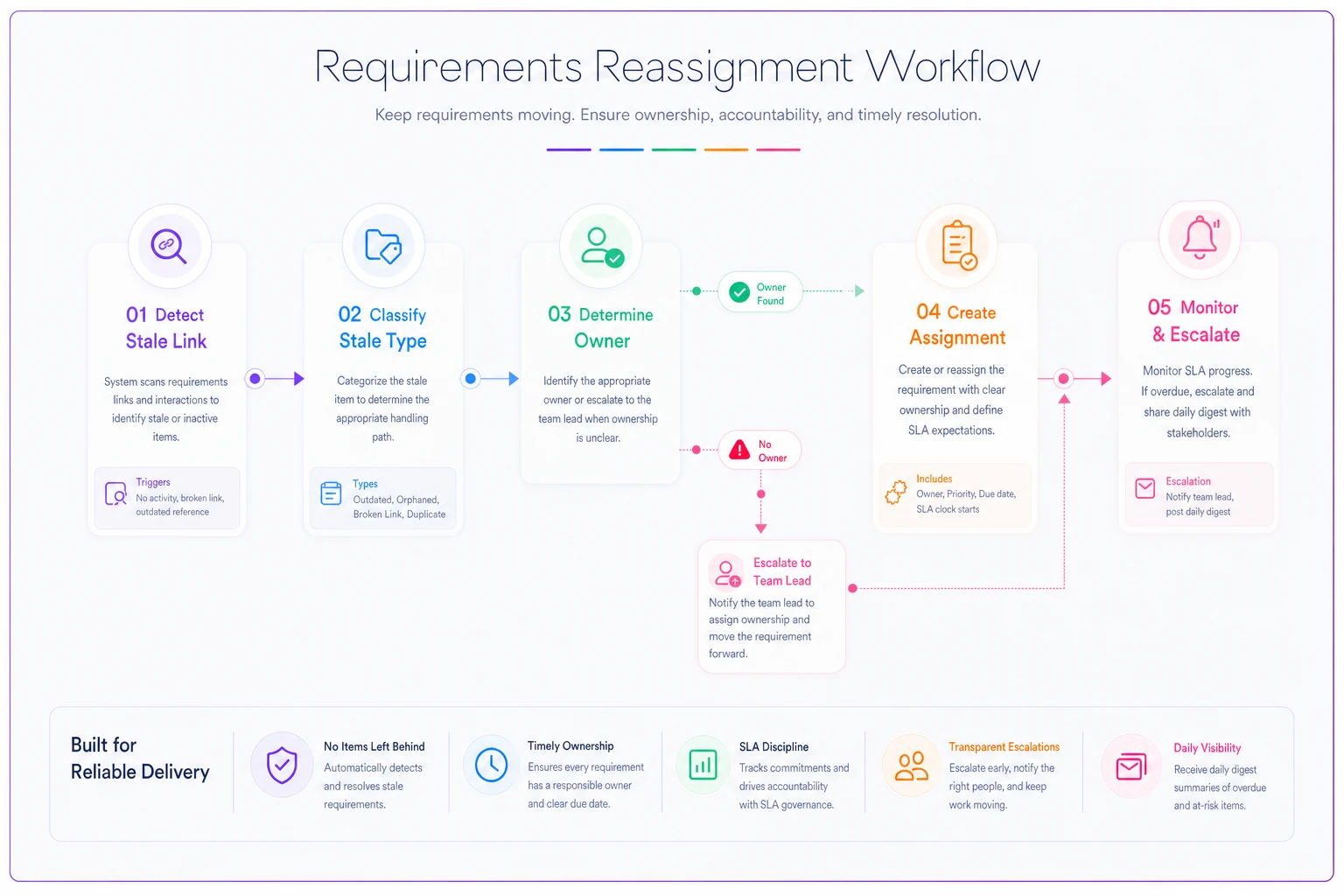
Add one escalation hop: if the task is still open past its due date, reassign up to the team lead and post a single summary to a review channel. Not a per-link firehose. One digest, once a day, with counts by severity. The teams that stay on top of this send something short that reads like "3 dangling, 1 status-drift, 0 overdue" — glanceable, not noisy.
Daily and weekly maintenance checklist
Automation catches the mechanical stuff. A short human rhythm catches the things automation can't judge. Keep it simple or it won't get done.
Daily (2–3 minutes, whoever owns the digest):
-
Scan the overnight reconciliation digest — note any new dangling or status-drift items
-
Confirm zero overdue escalations; if any, reassign or resolve on the spot
-
Spot-check one flagged link manually to make sure the classifier isn't misfiring
Weekly (15–20 minutes, in a standing slot):
-
Review all links touched by artifacts that changed this week — new stories, moved docs, deleted tests
-
Reconcile any items where the automated rule couldn't decide (content conflicts, ambiguous ownership)
-
Check the "ownership-abandoned" bucket for anyone who left or changed teams
-
Sample five healthy-marked links to confirm they're genuinely current, not just resolving
-
Update the "dead status" list if your workflow added new terminal states
The weekly spot-check of healthy links is the step everyone skips and the one that saves you.
The weekly spot-check of healthy links is the step everyone skips and the one that saves you. A classifier that only flags problems will happily pass a link that returns 200 but points to superseded content. Manually verifying a handful each week keeps you honest about false negatives.
A real scenario
A mid-sized fintech product team — around a dozen people across two squads — kept getting burned at release time. Requirements sat in Jira, acceptance criteria in Confluence, test cases in a separate QA tool. Roughly 400 active requirement links across the tracker, and no one was checking them between releases.
The pattern that kept biting them: a Confluence page holding acceptance criteria would get reorganized during a quarterly docs cleanup, links from Jira would silently redirect to an archive stub, and QA wouldn't discover it until they went to write tests two days before a release. It happened often enough that they were losing something like half a day of scramble per release cycle, plus the occasional slipped ship date.
They started with the simplest version of the URL-checking script above, run nightly against every linked doc, feeding a daily digest. First run flagged around 30 stale links — a mix of redirects, three outright dangling, and a cluster of version-mismatches where old spec URLs pointed at pre-cleanup pages. Nothing fancy, just a scheduled curl loop and a Slack post.
Within a couple of months the release-day scrambles mostly disappeared. Not because the tool was clever, but because staleness got caught when it happened instead of at the worst possible moment. The number that stuck with them wasn't a dramatic revenue figure — it was that release prep stopped eating a chunk of QA's week, and the "where did this link go?" conversations basically stopped.
When this is worth setting up — and when it isn't
Worth it when: your requirements and their linked artifacts live in different systems, you have more than a hundred or so active links, and you've been burned by a broken link at least once. Cross-tool traceability is where staleness hides, and manual checking stops scaling almost immediately. If your artifacts are spread across enough tools that no single person can hold the map in their head, you're past the point of doing this by hand — the same scaling wall covered in when requirements artifacts fail to scale.
Skip it, or keep it minimal, when: everything lives in one tool with native bidirectional links and referential integrity, or your total link count is small enough that your weekly review naturally surfaces problems. Building reconciliation automation for 40 links inside a single Jira project is over-engineering — the tool already tells you when a linked issue is closed.
Who should not do this: teams that haven't yet defined what a valid link is. If you don't have a clear rule for which artifacts should be linked and what states are terminal, automation will just generate a flood of ambiguous flags nobody can act on. Get the definition and the reconciliation rules straight first. The scripts are the last 20% of the work.
Bringing it together
Stale requirement links don't announce themselves. They resolve cleanly, pass a glance, and then betray you at the exact moment you need traceability to hold — an audit, a regression, a release cutover. The fix isn't a better tool for making links. It's a small, dull, reliable rhythm for checking whether the links you already have are still telling the truth.
Start with one script against your messiest cross-tool boundary. Add the reconciliation rules so flags resolve themselves. Wire a single daily digest and a two-tier escalation so nothing rots unassigned. Then let the weekly human pass catch what the machine can't judge. It's not glamorous work, but it's the difference between finding a broken link on a Tuesday morning and finding forty of them the night before you ship.
Start with one script against your messiest cross-tool boundary. Add the reconciliation rules so flags resolve themselves. Wire a single daily digest and a two-tier escalation so nothing rots unassigned. Then let the weekly human pass catch what the machine can't judge. It's not glamorous work, but it's the difference between finding a broken link on a Tuesday morning and finding forty of them the night before you ship.
Ready to transform your product delivery?
Join 2,000+ teams using GoReqly to improve requirements accuracy, reduce rework, and accelerate time to market.