

The worst version of this happens on a Thursday afternoon. Someone from compliance emails asking for "the evidence for release 4.12" — the requirements it satisfied, the tests that passed, who signed off on the risky database migration, and the deployment log showing it actually went out. And the answer lives in five different places: Jira, the CI dashboard, a Confluence page someone half-updated, a Slack thread, and a deploy log that rotates out in 30 days.
So the PM spends the next two days playing archaeologist. Screenshots get pasted into a doc. Links go stale. Someone reconstructs the decision about the migration from memory. By the time it's assembled, nobody's fully confident it's accurate — and it burned the equivalent of a day and a half of a senior person's time.
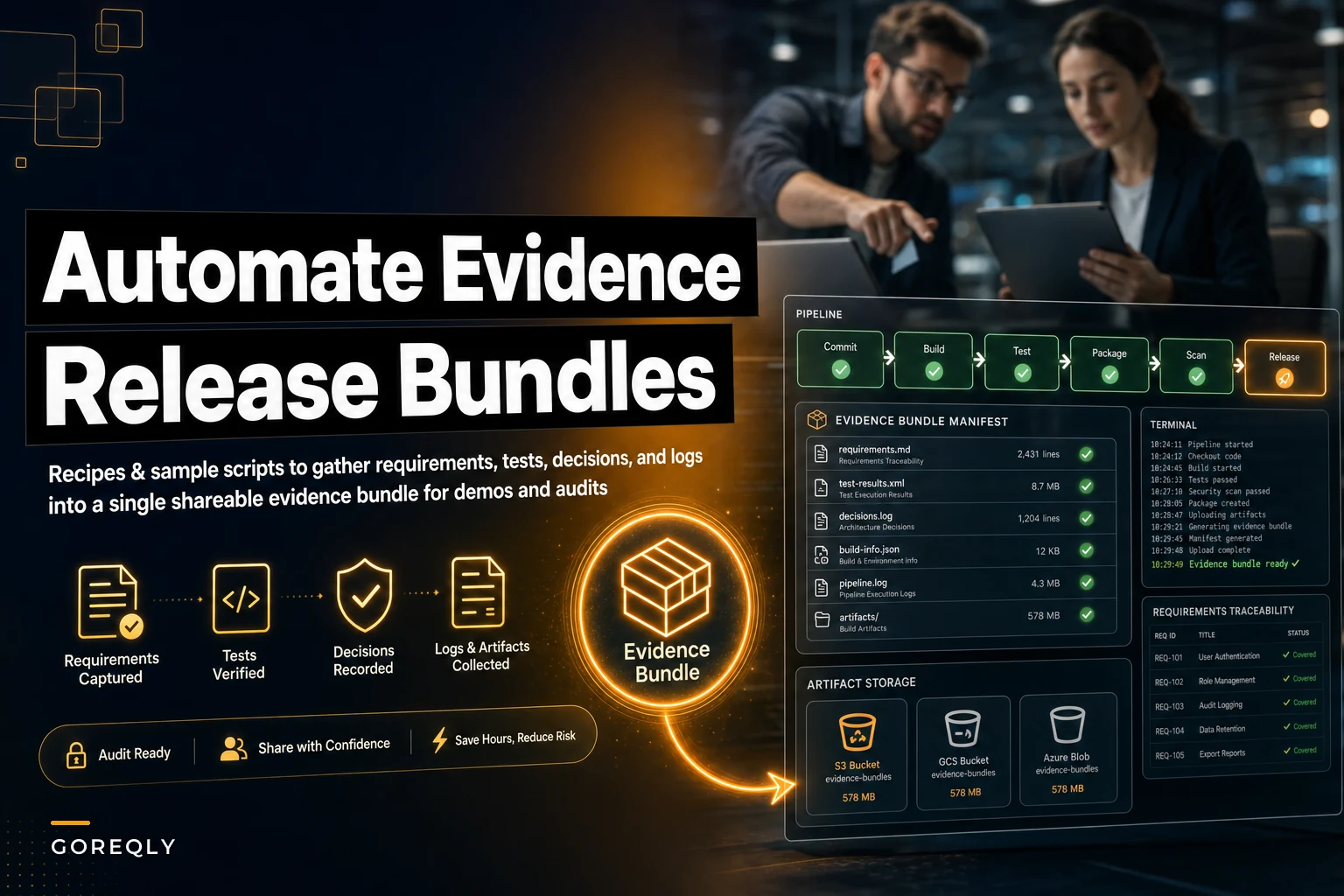
An automated release evidence bundle fixes this by capturing everything at the moment of release, while the links are still live and the context is fresh. This post covers the actual recipes — small scripts and pipeline hooks — that build that bundle for you, so demos and audits stop being fire drills.
What actually belongs in the bundle
Before writing any automation, be strict about scope. Teams that try to bundle "everything" end up with a 200MB zip nobody opens. The bundle should answer four questions an auditor or demo stakeholder will actually ask:
-
What did we say we'd build? — the requirements or stories tied to this release tag
-
How do we know it works? — test runs, coverage, acceptance criteria status
-
Why did we make the calls we made? — decision records for anything non-obvious
-
Did it actually ship, and when? — deployment logs, version tags, environment
Here's a practical breakdown of what each piece looks like when collected properly versus the usual mess:
| Artifact | The messy default | What the bundle should hold |
|---|---|---|
| Requirements / stories | Jira board, mutable, edited after the fact | Snapshot of story IDs + titles + acceptance status at release tag |
| Test evidence | Live CI dashboard link that expires | Frozen JUnit/coverage report + pass/fail summary per requirement |
| Decision records | Scattered in Slack, Confluence, someone's head | Linked ADRs (or short decision notes) referenced by story ID |
| Deployment log | Rotating log, gone in 30 days | Captured deploy manifest: version, commit SHA, env, timestamp, operator |
| Manifest | Doesn't exist | A single JSON/HTML index tying all of it together |
The manifest is the part most teams skip, and it's the most important. Without it, you have a folder of files. With it, you have something searchable and provable.
Why this falls apart without automation
The obvious reason is that artifacts live in different systems with different lifecycles. But the deeper problem is timing. Requirements get edited after release. CI results roll off. Deploy logs rotate. When you assemble evidence three weeks later, you're not capturing what was true at release — you're capturing a reconstruction, and reconstructions drift.
Stop losing track of critical project requirements.
GoReqly helps you capture, organize, and track every requirement with precision and clarity.
- Centralized requirements repository
- Collaborative editing & commenting
- Traceability & version control
No credit card required
A common pattern: a story gets marked "Done," then the acceptance criteria gets quietly reworded a sprint later to match what actually shipped. When the auditor pulls the current story, everything looks like it matched perfectly. That's not evidence — that's a story that's been edited to agree with reality. The whole point of an evidence bundle is to freeze the state at the moment of the release tag, so nobody has to trust anyone's memory.
The second reason it falls apart is ownership. Nobody owns "the evidence." QA owns tests, the PM owns stories, ops owns deploys. Evidence bundling sits at the seam between all of them, and seams are where things fall through. Automation is what lets you assign that job to the pipeline instead of a person who's already stretched thin.
If you've already got requirement-to-test links running through CI, you're most of the way there — the approach to automating requirement-to-test links with CI hooks gives you the connective tissue this bundle depends on. The bundle is essentially the packaging step that sits on top of it.
The core recipe: a bundle job triggered on release tag
The cleanest place to build the bundle is a CI job that fires when you cut a release tag. It runs after tests, right before or right after deploy, while everything is live and addressable.
Here's the shape of it as a numbered process:
-
Trigger on tag. Job runs on
git tag release/*or your release branch merge. This gives you a stable commit SHA to anchor everything to. -
Snapshot the requirements. Query your tracker's API for stories tied to this release (via fix-version, label, or commit trailer). Write titles, IDs, and acceptance status to a
requirements.json— a frozen copy, not a link. -
Capture test results. Pull the JUnit XML and coverage report from the test stage. Copy the raw files into the bundle. Generate a short summary mapping test suites to requirement IDs.
-
Gather decision records. Scan your ADR directory (or decision-notes folder) for records referencing any of the release's story IDs. Copy the matched ones in.
-
Record the deployment. After deploy succeeds, write a
deploy.json: version, commit SHA, environment, timestamp, and who or what triggered it. -
Build the manifest. Generate an
index.html(and amanifest.json) that links every artifact together, grouped by requirement. -
Publish. Push the zipped bundle to object storage (S3, GCS) or attach it to the release. Tag it with the release version so it's findable later.
Steps 2 and 6 are where most of the value lives. Snapshotting requirements is what makes the bundle honest. The manifest is what makes it usable.
Keep collection scripts idempotent so rerunning the job doesn't create duplicate artifacts.
A diagram of the bundle job workflow clarifies the steps:
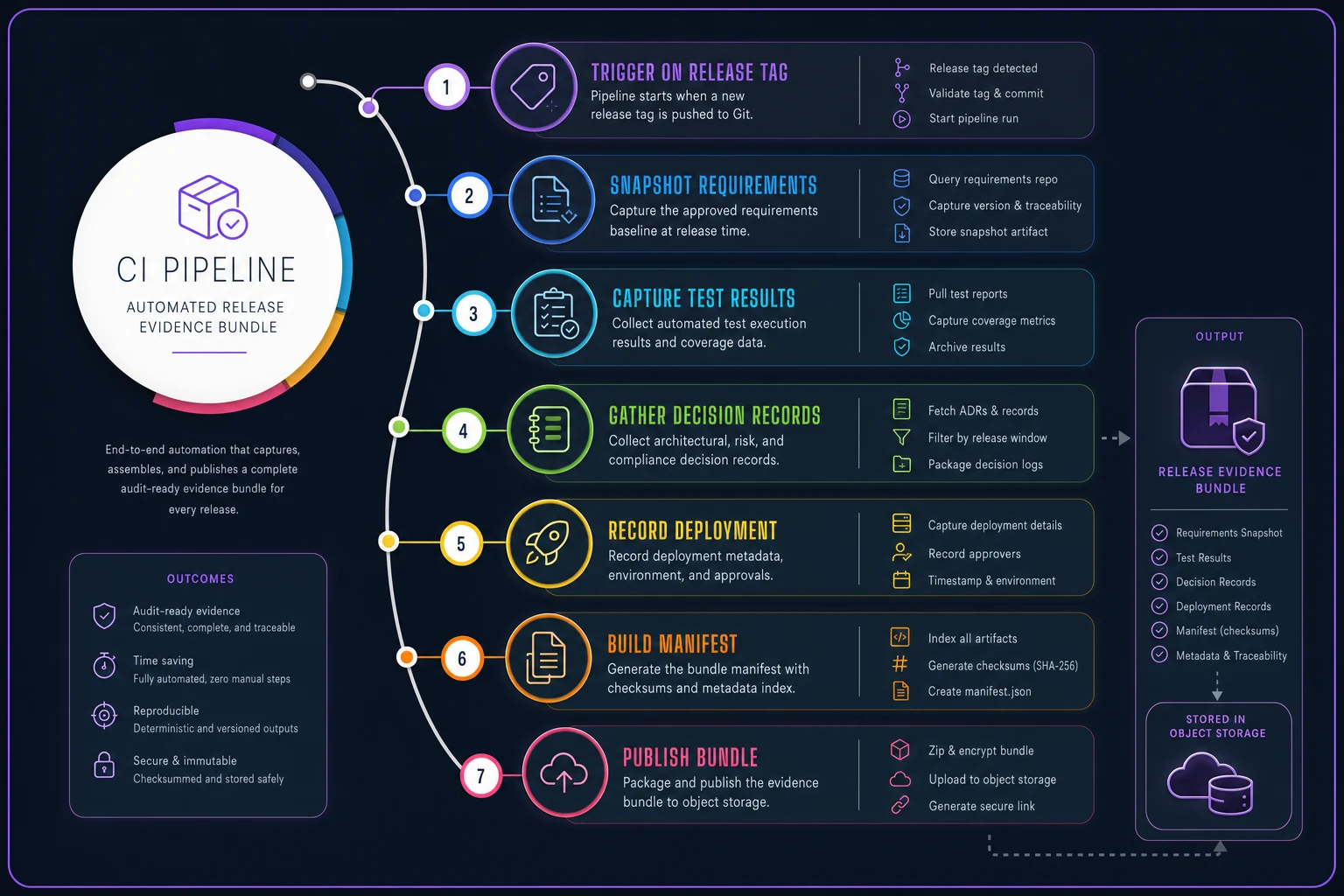
Keep the diagram focused on the sequence and where artifacts are written to the bundle.
A minimal manifest generator
Nothing fancy required. A small script that reads the collected JSON files and emits an index is enough:
import json, pathlib, datetime bundle = pathlib.Path("evidence") reqs = json.loads((bundle / "requirements.json").readtext()) deploy = json.loads((bundle / "deploy.json").readtext()) tests = json.loads((bundle / "testsummary.json").readtext()) manifest = { "release": deploy["version"], "commit": deploy["commitsha"], "deployedat": deploy["timestamp"], "environment": deploy["environment"], "generated": datetime.datetime.utcnow().isoformat(), "requirements": [] } for r in reqs: manifest["requirements"].append({ "id": r["id"], "title": r["title"], "acceptancestatus": r["status"], "tests": tests.get(r["id"], []), "decisionrecords": r.get("adrs", []) }) (bundle / "manifest.json").write_text(json.dumps(manifest, indent=2))
That's the whole idea. Everything downstream — the HTML view, the audit export — just reads this manifest. Keep the collection scripts dumb and treat the manifest as the single source of truth.
Linking decision records without a heavyweight process
Decision records are the piece teams struggle with most, because they're the least standardized. Tests have a format. Deploys have a log. Decisions live in prose, in whatever tool whoever was in that day happened to use.
The lightweight fix that actually holds up: require any non-trivial decision to leave a reference by story ID. It can be a markdown file in an adr/ folder, a labeled Confluence page, or a structured comment — as long as it contains the story IDs it relates to. Your bundle script then greps for those IDs and pulls in whatever it finds.
What this avoids is the impossible ask of "document every decision." You only need records for the calls someone might later question — the migration approach, the fallback you chose, the scope you deliberately cut. In real releases, that's usually two to five decisions, not fifty. If your bundle is pulling in twenty ADRs per release, either your ADRs are too granular or someone's treating them like a diary.
A real scenario: the fintech vendor and the surprise SOC 2 request
A ~40-person B2B payments company shipping every two weeks. Their audits weren't scheduled surprises — but the evidence requests were. A prospect's security team would ask for release evidence on a specific version as a condition of the deal, usually with a two-week turnaround that felt more like two days.
Before automation, assembling evidence for a single release took a senior engineer and the PM somewhere around 8–12 hours combined. They'd reconstruct test results, dig deploy logs out of archives, rewrite decision context from Slack scrollback. Twice they couldn't produce a deploy log at all because it had rotated, so they had to caveat the bundle — which is a bad look in front of a prospect's security team.
They added a bundle job to their pipeline over about a sprint and a half. Now every release tag produces a zipped bundle in S3 with the manifest, frozen test reports, matched ADRs, and the deploy record. When the next evidence request came in, the PM pulled the bundle for that version, spot-checked it, and sent it the same afternoon.
Prep time dropped from that 8–12 hour range to under an hour of review. But the bigger win was two deals that had stalled on "we'll get you the evidence" — those moved because the answer went from "give us a couple weeks" to "here it is." The first few bundles weren't perfect; they spent a while figuring out which decisions actually warranted an ADR. But the reconstruction problem went away entirely.
A quick checklist before you trust your bundle
Once your job runs, verify it's producing something an auditor would actually accept — not just a zip that exists:
-
[ ] Requirements are snapshotted, not linked to a live editable board
-
[ ] Every requirement maps to at least one test result (or an explicit "no test — why")
-
[ ] Test reports are the raw files, not screenshots
-
[ ] The deploy record has commit SHA, environment, timestamp, and trigger source
-
[ ] Decision records are matched by story ID, not manually attached
-
[ ] The manifest opens standalone — no dead links to internal tools
-
[ ] The bundle is tagged with the release version and retrievable months later
-
[ ] Someone who wasn't on the release can understand it without asking questions
That last one is the real test. If a new team member can open the bundle and reconstruct what shipped and why, it works. If they have to Slack you to make sense of it, it doesn't.
When this makes sense — and when it's overkill
Worth building if you ship on a cadence and face external evidence demands: regulated industries, enterprise sales security reviews, formal change management, or SOC 2 / ISO audits. It also earns its keep for teams doing frequent stakeholder demos who keep re-answering "wait, was that in this release?"
When it's overkill: a two-person team shipping to a handful of internal users, or an early-stage product where the release process changes every week. If your pipeline itself isn't stable, automating evidence collection on top of it just automates chaos. Get the CI-to-requirement links working first.
Who should hold off: teams without any traceability between stories and tests. The bundle assembles links that already exist — it doesn't create them. If you can't currently say which tests cover which requirement, that's the prerequisite, and it overlaps heavily with the groundwork in building a compliance-ready requirements traceability model. Fix the traceability, then package it.
Getting started without boiling the ocean
You don't need the full pipeline job on day one. Build the manifest generator first and run it manually against your last release. That forces you to find where each artifact actually lives and surfaces the gaps — usually a missing deploy log or decisions nobody wrote down.
Once you've produced one bundle by hand and it survives a real review, wire the collection steps into your pipeline one at a time: requirements snapshot first, then test capture, then deploy record, then decision matching. Each step is independently useful, so you're getting value before the whole thing is finished.
The goal isn't a perfect archival system. It's that the next time someone asks for evidence on release 4.12, the answer takes ten minutes instead of two days — and you're sending something frozen and accurate, not something you reconstructed and hope is right.
Ready to transform your product delivery?
Join 2,000+ teams using GoReqly to improve requirements accuracy, reduce rework, and accelerate time to market.