

Most accessibility acceptance criteria fall apart the moment a real audit shows up. Not because the team didn't care — usually they did — but because the criteria were written in a way that can't be verified, can't be traced to a specific WCAG success criterion, and left no record of who checked what. "Page must be accessible" passes review, ships, and then eighteen months later someone requests a VPAT and there's nothing to point to.
This post is a catalog of concrete criteria templates you can copy. Each one is tied to a specific WCAG check, an automated test hook where one exists, a named responsibility, and an evidence rule. The goal isn't to teach you WCAG — you already know 1.4.3 is contrast and 2.1.1 is keyboard. The goal is to make your criteria survive contact with an auditor.
Why "accessible" acceptance criteria fail the audit, specifically
The failure is almost never a knowledge gap. It's a traceability gap.
Here's the pattern. A story says "As a user I want to submit the contact form. AC: form is accessible and works with a screen reader." QA reads it, tabs through the form once, sees the fields get focus, marks it done. Ship it.
-
Which WCAG success criteria did "accessible" actually cover? Contrast? Labels? Error identification? Focus order? Nobody scoped it, so nobody knows.
-
What evidence proves it passed? "QA checked it" isn't evidence. There's no axe scan output, no screen-reader recording, no annotated screenshot.
-
Which release shipped the fix, and did a later release regress it? No link between the criterion and the build.
So the team ends up re-testing everything under deadline pressure — exactly the scramble the whole traceability model was supposed to prevent. If you've read our take on why NFRs die between spec and delivery, this is the same rot, just wearing an accessibility costume.
Three things make accessibility harder to trace than most non-functionals:
-
It's plural. One component touches contrast, focus, labels, roles, and error handling — five different success criteria, five different checks.
-
Automated tools only catch about a third of it. axe-core and Lighthouse are genuinely useful, but they can't tell you if your focus order makes sense or if your alt text is meaningful. Auditors know this, and they test the manual gaps first.
-
It regresses silently. A CSS refactor drops a contrast ratio from 4.6:1 to 4.1:1 and nothing breaks visually. No test catches it unless you wrote a test that catches it.
A CSS refactor can silently reduce contrast or change focus styles and nothing breaks visually. No test catches it unless you explicitly wrote a test to catch it.
The anatomy of an acceptance criterion that survives
Every template below follows the same five-field shape. If a criterion is missing any field, it will eventually fail an audit.
Stop losing track of critical project requirements.
GoReqly helps you capture, organize, and track every requirement with precision and clarity.
- Centralized requirements repository
- Collaborative editing & commenting
- Traceability & version control
No credit card required
| Field | What it does | Failure if missing |
|---|---|---|
| WCAG mapping | Ties the criterion to a specific success criterion + level | Auditor can't confirm coverage |
| Testable statement | Written so pass/fail is unambiguous | QA interprets it differently every sprint |
| Test hook | Automated check ID, or explicitly "manual" | Silent regressions, no CI gate |
| Responsibility | Named role who verifies (not "the team") | Nobody owns it, everybody assumes someone else |
| Evidence rule | What artifact proves it, and where it's stored | Nothing to hand the auditor |
The evidence rule is the field almost everyone skips, and it's the one that actually determines whether you pass. An auditor doesn't want your assurance — they want an artifact with a timestamp linked to a build.
The template catalog
These are written as fill-in patterns. Copy them into your story template and swap the specifics.
Contrast (WCAG 1.4.3, AA)
> AC: All text and icons in [component] maintain a contrast ratio of at least 4.5:1 for normal text and 3:1 for large text and UI component boundaries, in both [light] and [dark] themes.
> Hook: axe-core rule color-contrast in CI + Storybook contrast addon snapshot.
> Responsibility: Front-end dev at PR; designer sign-off on token change.
> Evidence: axe JSON report attached to the build; contrast values recorded in the design token changelog.
The thing people miss here: automated contrast checks pass on the default state and miss hover, focus, and disabled states. Add a line to the AC naming those states explicitly, or you'll ship a 2.9:1 hover color that no scan ever flagged.
Keyboard operability (WCAG 2.1.1, A)
> AC: Every interactive element in [flow] is reachable and operable by keyboard alone (Tab, Shift+Tab, Enter, Space, Arrow keys where applicable), with no keyboard trap.
> Hook: Partial — automated check for tabindex misuse; manual walkthrough for actual operability.
> Responsibility: QA runs the keyboard-only pass; documents the exact key sequence.
> Evidence: Screen recording of the keyboard-only run, stored against the release.
Be honest in the hook field. Marking this "automated" when it's really manual is how teams convince themselves they're covered and then fail the audit anyway. Keyboard reachability can be partially automated. Keyboard sense cannot.
Focus visibility and order (WCAG 2.4.7 + 2.4.3)
> AC: Focus indicator is visible on every interactive element with a contrast ratio of at least 3:1 against adjacent colors, and focus order follows a logical reading/interaction sequence in [flow].
> Hook: Manual + visual regression snapshot of focused states.
> Responsibility: QA verifies order against the documented expected sequence.
> Evidence: Annotated screenshots showing focus ring on each stop, plus the documented expected focus order.
Don't treat focus order as obvious. It isn't. A modal that traps focus but returns it to the wrong element on close passes every automated test and still fails 2.4.3. Write the expected order down as part of the AC so QA has something concrete to check against.
Names, roles, values (WCAG 4.1.2, A)
> AC: Every custom control in [component] exposes an accessible name, correct role, and current state (expanded/collapsed, selected, checked) to assistive tech.
> Hook: axe-core for role/name presence; manual screen-reader pass for correctness.
> Responsibility: Dev at PR (presence); QA with NVDA/VoiceOver (correctness).
> Evidence: axe report + screen-reader transcript noting announced name/role/state.
Presence is not correctness. axe will happily confirm an aria-label exists. It won't tell you the label says "button" on a button that submits a payment.
Error identification (WCAG 3.3.1 + 3.3.3)
> AC: When validation fails in [form], each error is identified in text, associated with its field programmatically (aria-describedby), and a correction suggestion is provided where the fix is known.
> Hook: Automated check that error nodes exist and are linked; manual screen-reader confirmation that errors are announced.
> Responsibility: Dev implements association; QA confirms announcement.
> Evidence: Screen-reader transcript of the error state; DOM snapshot showing aria-describedby wiring.
Images and non-text content (WCAG 1.1.1, A)
> AC: All meaningful images in [component] have alt text describing purpose; decorative images have empty alt (alt="") or are CSS backgrounds.
> Hook: axe-core image-alt (presence only) — meaningfulness is manual.
> Responsibility: Content author writes alt; reviewer confirms it's meaningful, not filename-dumped.
> Evidence: Alt-text review checklist entry in the content record.
Meaningfulness of alt text is a human judgment. Marking it as "automated" will fail you in an audit.
Wiring the hooks so regressions don't sneak back
The evidence rule is worthless if nobody collects the evidence automatically. The workflow that actually holds up looks like this:
-
PR stage. axe-core runs against the changed components in CI. The JSON output is stored as a build artifact, not just printed to a log that scrolls away. A failing automated rule blocks merge.
-
Story acceptance. For every manual hook, QA records the artifact — a short screen recording, a transcript, annotated screenshots — and attaches it to the story with the WCAG success criterion ID in the filename or metadata.
-
Release tagging. When the build ships, the accessibility artifacts get tagged to that release. This is the single step that makes an audit fast instead of a two-week archaeology dig.
-
Regression watch. Visual regression snapshots for focus and contrast states run on every subsequent build. A dropped contrast ratio or missing focus ring fails the snapshot diff before it reaches production.
Here's a simple workflow diagram of the stages described.
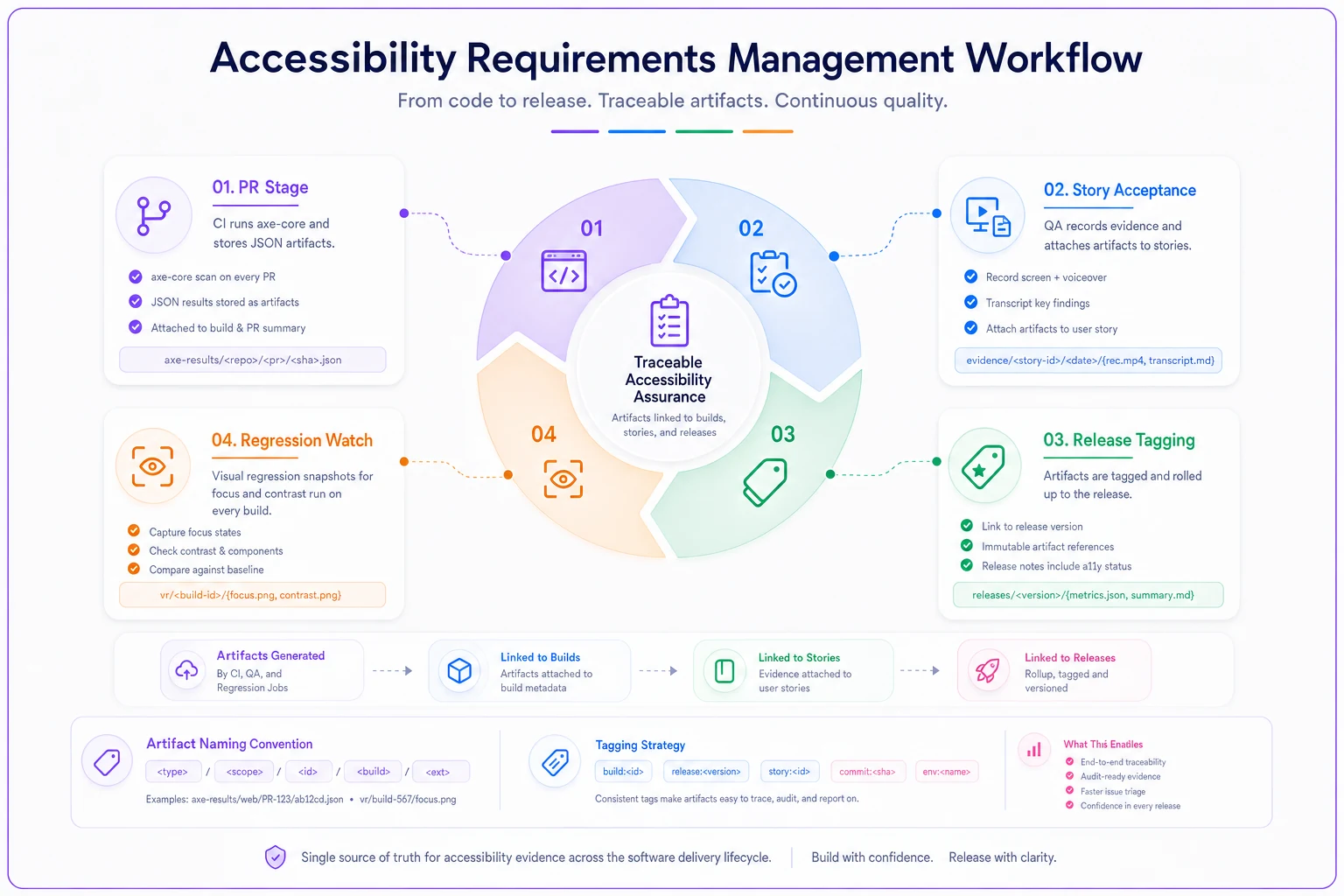
One thing most teams figure out too late: the artifact naming convention matters more than the tooling. If your screen-reader recording is named test-final-v2.mp4, an auditor can't map it to 4.1.2. If it's named 4.1.2checkout-button2024-11-03_build-1847.mp4, the audit answers itself. Cheap to enforce, enormous payoff.
Name artifacts with the WCAG ID, component, date, and build to make audits fast.
Enforce the artifact naming convention and attach artifacts to releases and stories; it turns a two-week archaeology dig into a two-day review.
A real scenario: the mid-size SaaS caught by a procurement RFP
A B2B scheduling product, around 40 engineers, no formal accessibility program. They'd been marking stories "accessible — verified by QA" for two years. Then a government-adjacent customer requested a VPAT as a condition of a roughly $180k renewal.
The gap: zero evidence. No axe reports retained, no screen-reader recordings, no mapping from any story to any WCAG criterion. QA had genuinely done keyboard passes on many features, but nothing was recorded, so it counted for nothing.
Producing a defensible VPAT took just over five weeks of two people's time — re-testing roughly 60 core flows, most of which had actually been fine all along. Somewhere in the $30k–$40k range of loaded cost, just to prove work that had already been done but never captured.
After that, they rewrote their story template to include the five-field criterion shape and enforced the artifact naming convention. The next quarterly audit-style review took about two days instead of five weeks, because the evidence was already tagged to releases. Their actual accessibility didn't improve dramatically in that first quarter — what changed was that the work became provable. That's the whole game.
When this level of rigor makes sense — and when it doesn't
When it's worth it:
-
You sell to government, education, healthcare, or enterprise procurement that asks for VPATs or ACRs.
-
You operate in a jurisdiction with active accessibility litigation risk.
-
You have components reused across many flows, where one regression multiplies.
When it's overkill:
-
A prototype or internal tool with a handful of known users and no compliance exposure. Writing evidence rules for a throwaway admin panel is process theater.
-
Very early-stage products still changing the UI weekly — lock down the template before you scale the team, not while you're still deciding what the product is.
Who should not do this yet: teams that haven't got basic requirements traceability working at all. Accessibility evidence sits on top of a functioning traceability model. If your stories don't link to releases in the first place, fix that foundation first — same as you'd want to convert legacy specs into stories and tests before layering compliance requirements on top of an existing mess.
A quick self-check before your next audit
Run your accessibility criteria against this list. If you can't tick a box, that's your gap:
-
[ ] Every accessibility AC names a specific WCAG success criterion and level (not "accessible")
-
[ ] Each criterion states whether its check is automated, partial, or manual — honestly
-
[ ] Automated checks (axe/Lighthouse) produce artifacts retained as build outputs, not just logs
-
[ ] Manual checks produce an artifact (recording, transcript, annotated screenshot)
-
[ ] Every artifact is named with the WCAG ID, component, date, and build
-
[ ] Artifacts are tagged to the release they shipped in
-
[ ] A named role — not "the team" — owns verification for each criterion
-
[ ] Focus and contrast states have visual regression snapshots guarding against silent regressions
If you can't tick a box, that's your gap.
The part nobody wants to hear
Automated accessibility tooling gives a false sense of completeness. axe-core returning zero violations feels like passing. But the checks it can't run — meaningful alt text, sensible focus order, correct announced names, logical error recovery — are exactly the ones auditors probe first, because they know that's where automated-only teams have holes.
The criteria templates above deliberately mark those as manual, with a required human-produced artifact. It's more work per story. It's also the difference between handing an auditor a folder and spending five weeks re-proving work you already did.
The teams that survive audits aren't the ones with the fanciest tooling — they're the ones whose criteria were written so that "done" always came with an artifact attached.
The teams that survive audits aren't the ones with the fanciest tooling — they're the ones whose criteria were written so that "done" always came with an artifact attached.
Ready to transform your product delivery?
Join 2,000+ teams using GoReqly to improve requirements accuracy, reduce rework, and accelerate time to market.