



The product manager at a medical device company showed me their requirements nightmare last month. Three filing cabinets. Binders labeled "System Requirements v3.2 FINAL FINAL." Word documents with track changes from 2019. A SharePoint graveyard where specifications went to die.
"We're going agile," she said. "But we can't just throw away seven years of requirements documentation. Some of this stuff is still relevant. Maybe 30 percent? 40 percent? We have no idea."
This happens everywhere. Companies sitting on mountains of legacy specs — functional requirements, technical specifications, design documents — while their development teams have moved to user stories and sprints. The documentation represents thousands of hours of analysis and domain knowledge. But nobody knows how to bridge the gap between 200-page requirement documents and a JIRA backlog.
Most teams handle this badly. They either abandon the legacy documentation completely (losing critical business logic) or try to convert everything at once (creating an unmaintainable mess). Both approaches fail because they don't account for the fundamental difference between how traditional specs and agile stories organize information.
The decomposition problem nobody talks about
Legacy specifications organize information by system component. User stories organize by value delivery. That's not just a formatting difference — it's a completely different mental model.
A typical legacy spec might say: "The system shall provide user authentication with password complexity requirements including minimum 8 characters, one uppercase, one number, and one special character." Clear enough. But that single requirement might spawn five different user stories across three different sprints, each with its own acceptance criteria and test cases.
The real challenge isn't rewriting. It's decomposition. How do you break apart a monolithic requirement into discrete, testable, deliverable chunks without losing critical dependencies or creating gaps?
Legacy specs often bundle multiple concerns into single statements. That authentication requirement above? It's mixing security policy, user experience, and system behavior. In an agile world, those might live in completely different parts of your backlog, owned by different teams, scheduled in different releases.
Traditional migration approaches treat this like a translation problem. Take Requirement A, rewrite it as Story B. But that's like trying to turn a blueprint into a recipe. The information is all there, but the structure and purpose are fundamentally different.
The staged decomposition workflow
After watching dozens of teams struggle with this, one approach consistently works: staged decomposition with explicit traceability. Not exciting, but it prevents the two most common failures: lost requirements and scope explosion.
Stop losing track of critical project requirements.
GoReqly helps you capture, organize, and track every requirement with precision and clarity.
- Centralized requirements repository
- Collaborative editing & commenting
- Traceability & version control
No credit card required
The workflow breaks into four distinct stages, each with its own deliverables and decision points:
-
Source Document (with version)
-
Requirement ID
-
Requirement Text
-
Business Area
-
Status (Active/Obsolete/Unknown)
Stage 1: Inventory and Classification
Start by mapping what you actually have. Not what you think you have — what's actually in those documents. Create a simple inventory spreadsheet with five columns:
Most teams skip this step because it feels like busywork. Then six months later they're in a meeting arguing about whether a requirement was already converted or accidentally dropped. The inventory becomes your source of truth.
During classification, you're making a critical decision for each requirement: Is this still relevant? Around 40-60% of legacy requirements typically turn out to be obsolete — referring to features that were descoped, systems that were replaced, or business processes that changed.
Stage 2: Functional Grouping
Take your active requirements and group them by user journey, not by system component. This is where most conversions fail. Teams try to maintain the original document structure, creating stories like "Database Requirements" or "Security Module Features."
Instead, identify the actual user workflows hidden in your specs. That authentication requirement becomes part of a "First-Time User Onboarding" journey. A data validation rule becomes part of "Order Processing Workflow."
The grouping exercise reveals gaps and overlaps. You'll find requirements that reference the same functionality with slightly different wording. You'll discover implicit dependencies that were never documented. Document these discoveries — they become critical input for your story writing.
Stage 3: Story Decomposition
Now you're ready to actually write stories. But you're not converting requirements one-to-one. You're creating stories that deliver value while incorporating relevant requirements.
-
Identify the user outcome
-
List all requirements that contribute to that outcome
-
Extract acceptance criteria from requirement details
-
Flag technical constraints as story notes
-
Create test scenarios from requirement specifications
For example, that authentication requirement might decompose into:
Story: As a new user, I want to create a secure password so my account remains protected Traced Requirements: REQ-AUTH-001, REQ-SEC-017, REQ-UI-044
-
Password must contain 8+ characters
-
Password must include uppercase, number, and special character
-
System displays real-time password strength indicator
-
Failed passwords show specific validation errors
Technical Notes: Password hashing using bcrypt (from REQ-SEC-018)
A simple visual of the staged decomposition helps teams see dependencies and traceability.
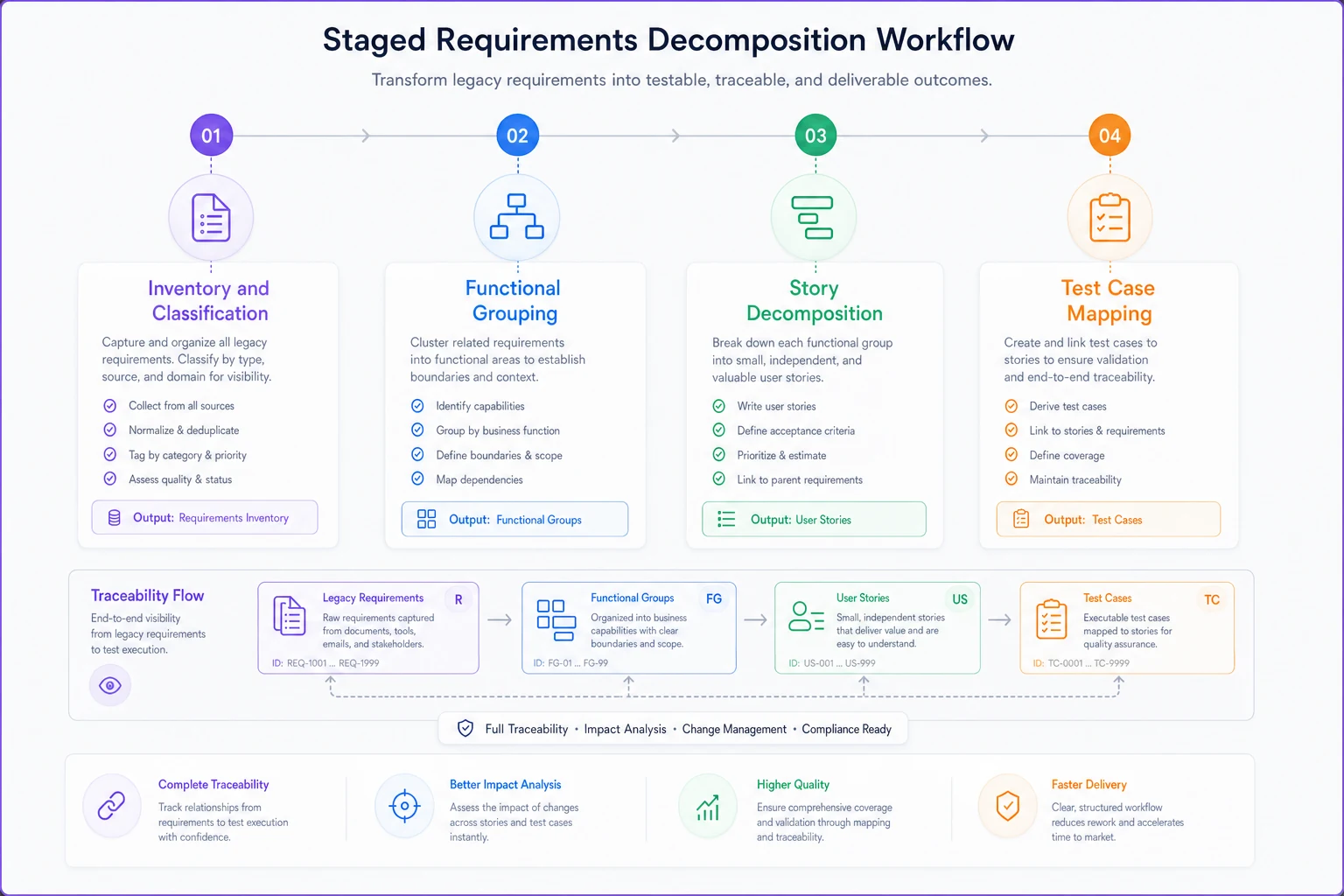
Stage 4: Test Case Mapping
The final stage converts requirement-level testing into story-level validation. Legacy specs often include detailed test procedures that shouldn't be lost. But copying them wholesale into every story creates redundancy and maintenance nightmares.
Instead, create a test case library that stories can reference. Each test case maintains traceability back to its source requirement, but lives independently in your test management system.
Naming and traceability conventions that actually work
Traceability falls apart without consistent naming. Most naming schemes become so complex that nobody follows them. Here's a simple convention that scales:
Legacy Requirement IDs: Keep them unchanged. REQ-AUTH-001 stays REQ-AUTH-001.
Story IDs: [THEME]-[JOURNEY]-[SEQUENCE] Example: ONBD-SIGNUP-003 (Onboarding theme, Signup journey, third story)
Traceability Tags: Add legacy IDs as story tags, not in the title or description. This keeps stories readable while maintaining the connection.
Keep legacy IDs unchanged and add them as tags so audits and searches remain straightforward.
Test Case IDs: TC-[STORY]-[NUMBER] Example: TC-ONBD-SIGNUP-003-01
Don't try to encode all relationship information in the ID itself. Use your tooling's linking and tagging features. The ID just needs to be unique and followable.
Create a simple traceability matrix in a spreadsheet:
| Legacy Req | Story ID | Test Cases | Release | Status |
|---|---|---|---|---|
| REQ-AUTH-001 | ONBD-SIGNUP-003 | TC-003-01, TC-003-02 | R2.1 | Delivered |
| REQ-SEC-017 | ONBD-SIGNUP-003 | TC-003-01 | R2.1 | Delivered |
| REQ-UI-044 | ONBD-SIGNUP-004 | TC-004-01 | R2.2 | In Progress |
This matrix becomes your audit trail. When someone asks "What happened to requirement X?" you have an immediate answer.
The prioritization rubric everyone gets wrong
The biggest mistake teams make: trying to convert everything before starting development. You end up with 500 half-written stories and no delivered value.
Release 1 (Weeks 1-2): High-Risk Core
-
Requirements tied to regulatory compliance
-
Requirements blocking other teams
-
Requirements with external dependencies
-
Target
15-20% of total requirements
Release 2 (Weeks 3-4): High-Value User Journeys
-
Complete user workflows that deliver measurable value
-
Requirements that enable new functionality
-
Requirements replacing manual processes
-
Target
25-30% of total requirements
Release 3 (Weeks 5-6): Integration Points
-
Requirements affecting system interfaces
-
Data migration and compatibility requirements
-
Requirements with complex test scenarios
-
Target
20-25% of total requirements
Release 4 (Weeks 7-8): Enhancement and Edge Cases
-
Non-critical business rules
-
UI refinements and preferences
-
Error handling and logging
-
Target
20-25% of total requirements
Parking Lot: Defer or Delete
-
Requirements with unclear business value
-
Requirements for deprecated features
-
Requirements better handled as technical debt
-
Target
10-15% of total requirements
The rubric forces decisions. Not every requirement deserves equal attention. Some need immediate conversion, others can wait, and many should be archived.
Real-world migration: healthcare scheduling system
A healthcare scheduling platform had 2,100 requirements spread across 14 documents. Their development team had already moved to two-week sprints, but product decisions kept referencing the old specs.
They started with the inventory stage. Took two people three days to catalog everything. Found that 600 requirements were completely obsolete — referring to a legacy system they'd already replaced. Another 400 were duplicates with slightly different wording.
That left 1,100 actual requirements to convert.
Using the functional grouping approach, they identified 12 major user journeys:
-
Patient scheduling
-
Provider availability management
-
Appointment reminders
-
Insurance verification
-
etc.
Each journey contained between 40 and 150 related requirements. They assigned one analyst to each journey for the decomposition phase.
The first release focused on patient scheduling — 180 requirements decomposed into 32 stories. They maintained complete traceability, so when compliance auditors asked about HIPAA-related requirements, they could immediately show which stories addressed them.
Eight weeks later, they had:
-
1,100 requirements properly catalogued
-
340 user stories written and traced
-
89 stories delivered in production
-
450 requirements deferred to future releases
-
310 requirements archived as obsolete
The success factor wasn't the process itself. It was staging the work so they could deliver value while migrating. Teams often think they need to convert everything before starting development. That's backwards. You need just enough conversion to support the next release.
Common failure patterns and their fixes
The Completionist Trap Teams try to convert every requirement before writing any code. Six months later, they have beautiful documentation and no working software. Fix: Convert only what you need for the next two releases. Leave the rest in legacy format until needed.
The Literal Translation Taking requirement language directly into story format. "The system shall..." becomes "As a system, I want to..." These aren't real user stories. Fix: Always identify the actual user and their goal. If you can't, it might be a technical constraint, not a story.
The Orphan Requirement Requirements that don't fit into any user journey. Teams either force them into unrelated stories or create standalone technical stories. Fix: Create a "Platform Capabilities" epic for cross-cutting concerns. These become enabler stories that support multiple user journeys.
The Test Case Explosion Converting every requirement test into story-level testing. A single story ends up with 50 test cases. Fix: Distinguish between story-level acceptance tests (5-7 per story) and regression tests (maintained separately).
The Dependency Nightmare Requirements with complex dependencies converted into stories with complex dependencies. The backlog becomes unmanageable. Fix: Reframe dependencies as story sequencing. If Story B needs Story A's output, that's a release planning concern, not a story dependency.
When to automate (and when not to)
The migration process generates massive amounts of repetitive work. Creating inventory spreadsheets. Writing traceability matrices. Generating story templates. This is where AI-powered operational software becomes genuinely useful — not for decision-making, but for the mechanical conversion tasks.
A requirements management platform with AI automation can parse legacy documents and create initial inventory lists. It won't make perfect decisions about what's obsolete, but it can identify duplicate requirements and suggest functional groupings based on keyword analysis.
The decomposition stage resists automation. Deciding how requirements map to user value requires human judgment. But once those decisions are made, generating consistent story formats and maintaining traceability matrices? That's purely mechanical.
What actually works: analysts make the strategic decisions about grouping and prioritization, then use automated tools to handle the documentation and tracking. The time savings aren't in the thinking work — it's in the administrative overhead.
One team reduced their migration timeline from six months to eight weeks by automating just three things:
-
Initial requirement parsing and inventory
-
Story template generation with pre-populated traceability
-
Test case linking and coverage analysis
They still spent the same amount of time on analysis and decision-making. But the mechanical work that usually kills migration projects — maintaining spreadsheets, updating traceability, formatting stories — dropped by roughly 70%.
The 90-day reality check
Three months after migration, most teams face the same realization: they converted too much. Stories sit in the backlog for years, never implemented. Requirements traced to stories that keep getting deprioritized. Test cases for features nobody actually wanted.
This isn't failure. It's the natural outcome of moving from predictive to adaptive planning. Legacy specs assumed you could define everything upfront. Agile assumes you'll learn and adjust.
The teams that succeed treat migration as an ongoing process, not a one-time project. They establish a simple review cycle:
Every release, ask:
-
Which converted stories actually got built?
-
Which requirements proved irrelevant?
-
What new requirements emerged that weren't in the legacy specs?
Every quarter, prune:
-
Archive stories that haven't moved in 6 months
-
Remove traceability for obsolete requirements
-
Update the parking lot with newly discovered needs
The goal isn't perfect conversion. It's maintaining enough traceability to satisfy stakeholders while building software that actually delivers value.
Your legacy specifications contain real knowledge. Customer negotiations, compliance requirements, hard-won understanding of business processes. Don't landfill all of that in the rush to become agile. But also don't let it become an anchor that prevents you from moving forward.
The staged workflow described here isn't the only way to handle migration. But it solves the core problem: how to preserve critical requirements knowledge while enabling iterative development. Start with your highest-risk requirements, maintain clear traceability, and convert only what you need for upcoming releases.
Most importantly, give yourself permission to leave requirements unconverted. Not every piece of legacy documentation needs to become a user story. Some requirements are better left as reference material, consulted when needed but not actively managed in your backlog.
The companies that successfully bridge the gap between legacy documentation and agile development share one characteristic: they treat migration as a way to deliver value, not as a documentation exercise. Your 500 pages of requirements aren't the goal. They're raw material for building software that matters.
Ready to transform your product delivery?
Join 2,000+ teams using GoReqly to improve requirements accuracy, reduce rework, and accelerate time to market.